
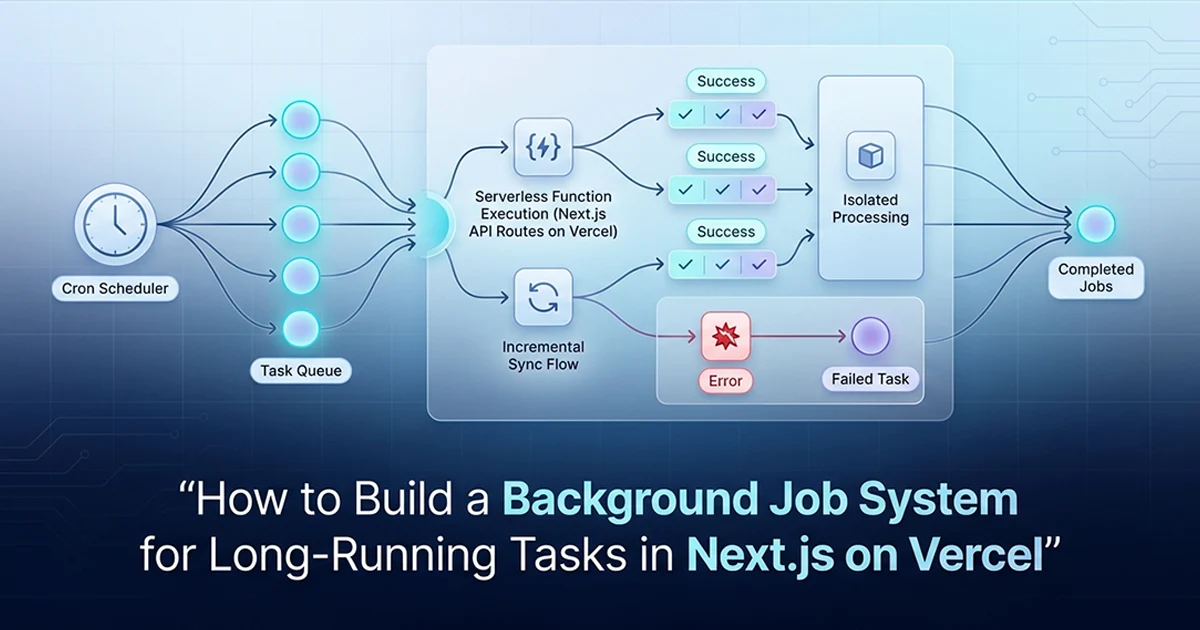
The Serverless Timeout Problem No One Mentions Until Production
Vercel serverless functions time out at ten seconds on Hobby and sixty on Pro—any background job that exceeds this gets killed mid-run, leaving affiliate sales data in a partial, untrustworthy state. Hourly cron pulls 6 APIs with per-network isolation; SyncLog rows track last success, each run stays under the 60-second Vercel Pro timeout, and the platform runs 10 tools on $20-60/month AI spend. Platform totals from production: 10 tools, 6 networks, $20-60/month AI spend, 58,641 lines, 4-month solo build.
See also: Celery + FastAPI task queue for long AI jobs and async AI pipelines that run for hours.
Execution limits by plan
Hobby: ten seconds. Pro: sixty seconds for standard functions. Enterprise: up to three hundred seconds on standard routes, nine hundred on background functions. An affiliate marketing SaaS I built syncs ClickBank, Digistore24, BuyGoods, MaxWeb, JVZoo, and Hotmart for every connected user—decrypt credentials, call six different APIs, normalize hundreds of NormalizedSale rows, upsert into Postgres. The naive approach—fetch full history every hour—blew past sixty seconds in staging before a single real user onboarded.
The failure mode is worse than a clean error. Vercel terminates the function at the ceiling without rolling back database writes that already committed. User A's ClickBank rows land while Hotmart never runs. Dashboard charts show earnings that look real but undercount by twenty or thirty percent. Debugging this in production means correlating Vercel function logs with partial Postgres state—hours I could have avoided by designing for delta sync from the first deploy.
The fix is not a longer timeout
Without incremental sync, the job dies at second sixty-one with half the networks written and half missing—worse than failing fast because dashboards show plausible but incomplete earnings. With incremental sync, each adapter receives since: lastSuccessfulRun and fetches only records created or updated after that timestamp. First run may crawl; every subsequent hourly tick on schedule 0 * * * * typically finishes under fifteen seconds regardless of user count. That architectural decision—not upgrading to Enterprise—is what makes background jobs Next.js Vercel cron long running workloads viable on Pro.
I considered BullMQ on a separate VPS and Qstash before committing to Vercel Cron. Both add infrastructure, monitoring, and another monthly bill. For an hourly sync where change volume is bounded—new sales since last hour, not entire affiliate histories—incremental design keeps the job inside existing Pro limits. The timeout ceiling becomes a non-issue when you stop asking the function to do work it does not need to repeat.
Setting Up Vercel Cron: vercel.json and the Route Handler
Vercel Cron requires one entry in vercel.json and a standard Next.js API route at the configured path—no external scheduler, no Redis queue, no new infrastructure bill.
The vercel.json configuration
The crons array maps path to schedule using standard cron syntax. 0 * * * * fires at the top of every hour—minute zero, every hour, every day. Vercel invokes the route with GET by default. The route lives outside auth middleware—proxy.ts excludes /api/cron/* because this is server-to-server, not a browser session.
Cron syntax follows the five-field pattern: minute, hour, day-of-month, month, day-of-week. 0 * * * * means minute zero of every hour. 0 6 * * * would run daily at six AM UTC. */15 * * * * runs every fifteen minutes—useful for high-frequency webhook reconciliation, though affiliate sales sync rarely needs sub-hourly polling. Vercel Cron on production requires Pro or above; Hobby plans cap cron invocations tightly enough that hourly production jobs are unreliable.
The route handler structure
Auth check first, then runSalesSync(), then return JSON with durationMs and per-account results. Standard API route—not a Server Action. Server Actions tie to user sessions; cron jobs have none.
After deploy, Vercel's cron dashboard shows invocation history, response codes, and durationMs from your JSON payload. I log every SyncResult to the response body so a failed ClickBank sync appears as a four-hundred-level account entry inside a two-hundred-level cron response—the job succeeded, one account did not. That distinction matters for alerting: page on repeated account failures, not on every cron tick that completes with partial errors.
Part A — vercel.json
{
  "crons": [
    {
      "path": "/api/cron/sync-sales",
      "schedule": "0 * * * *"
    }
  ]
}
Part B — app/api/cron/sync-sales/route.ts
import { isCronRequest } from '@/lib/cron-auth'
import { runSalesSync } from '@/features/sales-tracking/services/run-sales-sync'

/**
 * Triggered hourly by Vercel Cron (GET). Not protected by auth middleware —
 * secured via isCronRequest() instead.
 */
export async function GET(request: Request) {
  if (!isCronRequest(request)) {
    return Response.json({ error: 'Unauthorized' }, { status: 401 })
  }

  const startedAt = Date.now()

  try {
    const results = await runSalesSync()
    return Response.json({
      success: true,
      durationMs: Date.now() - startedAt,
      results,
    })
  } catch (error) {
    return Response.json(
      { success: false, error: String(error) },
      { status: 500 }
    )
  }
}
Set SALES_TRACKING_DRY_RUN=true in staging to fetch from network APIs without writing to Postgres. Verify credentials, inspect raw payloads, and exercise sync logic before polluting production AffiliateSale rows—same pattern works for any background job that mutates database state.
Securing the Cron Route: Two Layers of Protection
Vercel automatically adds x-vercel-cron: 1 to cron-triggered requests, but relying on a single header is fragile—pair it with a CRON_SECRET environment variable for defense-in-depth.
Why cron routes need explicit protection
/api/cron/sync-sales is public on the internet if you deploy it. proxy.ts intentionally skips cron paths—there is no session cookie on Vercel's scheduler invocation. Without manual checks, anyone who discovers the URL triggers a six-network API stampede against your credential store.
The two-header check implementation
x-vercel-cron proves Vercel fired the job. CRON_SECRET in Authorization: Bearer lets you trigger manually from Postman, a local script, or CI without forging Vercel headers. Use both—not either-or.
Generate CRON_SECRET as a random thirty-two-plus character string in your Vercel project environment variables. For manual triggers, pass Authorization: Bearer <CRON_SECRET> in the request header. Vercel does not inject CRON_SECRET automatically—you configure it in the cron job settings if you want scheduled invocations to also satisfy the bearer check. My route accepts either signal: x-vercel-cron: 1 from Vercel's scheduler, or a valid bearer token from my staging test script. Requests from a browser tab with neither header get a four-zero-one immediately.
// src/lib/cron-auth.ts

/** Accept Vercel's cron signal OR a valid CRON_SECRET bearer token. */
export function isCronRequest(request: Request): boolean {
  if (request.headers.get('x-vercel-cron') === '1') return true

  const secret = process.env.CRON_SECRET
  if (secret && request.headers.get('authorization') === `Bearer ${secret}`) {
    return true
  }

  return false
}

// src/lib/auth.ts — required when cron touches session-aware code paths

import NextAuth from 'next-auth'

export const { handlers, auth, signIn, signOut } = NextAuth({
  // Vercel proxy sends a host header that may not match NEXTAUTH_URL.
  // Without this, cron routes touching auth() throw silent host-mismatch errors.
  trustHost: true,
  providers: [/* ... */],
  callbacks: { /* ... */ },
})
Set trustHost: true in your NextAuth v5 config on Vercel. Requests through Vercel's proxy infrastructure send host headers that may not match NEXTAUTH_URL—cron jobs that touch session data fail with obscure host-mismatch errors until you add this flag. Hassan Raza documents the same fix in the NextAuth v5 RBAC post on hassanr.com.
Incremental Sync: Staying Under the Timeout Ceiling
Store a lastSyncedAt timestamp per userId and network pair, pass it to each adapter, and fetch only records created since the last successful run—most hourly syncs drop from minutes to under fifteen seconds.
Why full-history sync on every run is a trap
Replaying years of ClickBank receipts every hour scales linearly with history size, not with change rate. Multi-tenant SaaS with dozens of users multiplies the problem. The Pro sixty-second ceiling is fixed—you cannot outrun it by optimizing HTTP client code alone.
The lastSyncedAt pattern via SyncLog
My first version stored lastSyncedAt on AffiliateNetworkAccount. When ClickBank succeeded but Hotmart failed mid-run, updating the timestamp skipped missed Hotmart records; skipping the update re-fetched ClickBank duplicates. Retrofitting a SyncLog model cost two days. Derive lastSyncedAt from the most recent successful SyncLog row per (userId, network)—full audit trail, correct incremental behavior after partial failures.
Each NetworkAdapter implements fetchSales(credentials, since?: Date). On first run, since is undefined and the adapter pulls full history—slow but unavoidable. On every subsequent run, since equals lastRecordDate from the latest successful SyncLog. ClickBank returns receipts after that timestamp; Digistore24 returns orders after that timestamp. Upserts remain idempotent via the composite key from the adapter pattern post, so re-fetching overlapping windows never duplicates rows—it refreshes status when PENDING becomes APPROVED.
// prisma/schema.prisma (excerpt)

model SyncLog {
  id             String    @id @default(cuid())
  userId         String
  network        String
  startedAt      DateTime
  completedAt    DateTime?
  recordsSynced  Int       @default(0)
  success        Boolean
  error          String?
  lastRecordDate DateTime?
}

// src/features/sales-tracking/services/sync-network-account.ts

import { prisma } from '@/lib/db'
import { upsertSale } from './upsert-sale'
import type { NetworkAdapter, SyncResult } from '../adapters/types'

async function getLastSyncedAt(userId: string, network: string): Promise<Date | null> {
  const lastSuccess = await prisma.syncLog.findFirst({
    where: { userId, network, success: true },
    orderBy: { completedAt: 'desc' },
    select: { lastRecordDate: true },
  })
  return lastSuccess?.lastRecordDate ?? null
}

export async function syncNetworkAccount(
  userId: string,
  network: string,
  credentials: NetworkCredentials,
  adapter: NetworkAdapter
): Promise<SyncResult> {
  const startedAt = new Date()

  try {
    const since = await getLastSyncedAt(userId, network)
    const sales = await adapter.fetchSales(credentials, since ?? undefined)

    if (process.env.SALES_TRACKING_DRY_RUN !== 'true') {
      for (const sale of sales) {
        await upsertSale(userId, sale) // idempotent — see adapter pattern post
      }
    }

    const lastRecordDate = sales.reduce<Date | null>((max, s) => {
      if (!max || s.saleDate > max) return s.saleDate
      return max
    }, null)

    await prisma.syncLog.create({
      data: {
        userId,
        network,
        startedAt,
        completedAt: new Date(),
        recordsSynced: sales.length,
        success: true,
        lastRecordDate,
      },
    })

    return { userId, network, success: true, recordsSynced: sales.length }
  } catch (error) {
    await prisma.syncLog.create({
      data: {
        userId,
        network,
        startedAt,
        completedAt: new Date(),
        recordsSynced: 0,
        success: false,
        error: error instanceof Error ? error.message : 'Unknown error',
      },
    })

    return {
      userId,
      network,
      success: false,
      recordsSynced: 0,
      error: error instanceof Error ? error.message : 'Unknown error',
    }
  }
}
The timeout ceiling is not your enemy. Fetching more data than you need to is. Design the sync around what changed since last time, not what exists in total — and the ceiling becomes irrelevant.
Per-Account Failure Isolation: One Broken Network, Zero Collateral Damage
Wrap each network account's sync in its own try/catch—a failed ClickBank credential for User A never prevents Digistore24 from syncing for User B.
The sync loop structure
runSalesSync loads users with connected AffiliateNetworkAccount rows, decrypts credentials server-side with AES-256-GCM, resolves the matching NetworkAdapter from the registry, and calls syncNetworkAccount per (userId, network). The outer loop never throws on inner failures—results accumulate as SyncResult[] returned to the cron route JSON response.
Concrete failure: User A's ClickBank API key expired—401 on the first adapter call. syncNetworkAccount catches the error, writes SyncLog with success: false and error: "401 Unauthorized", returns a failed SyncResult. The loop continues to User A's Digistore24 account, then all six networks for User B. Total job duration on a typical hourly run: eight to twelve seconds across four users and eighteen network accounts. One broken credential never blocks the other seventeen.
Conceptually: for (const user of users) { for (const account of user.networkAccounts) { try { await syncNetworkAccount(...) } catch { log + continue } } }. One broken credential logs to SyncLog with success: false and the job marches forward.
What to do with failures — dashboard health derivation
Green: last SyncLog for this network is success and completedAt within two hours. Yellow: last success but older than two hours—cron may be delayed or the job queue backed up. Red: last SyncLog is failure—credentials invalid or API down. Operators see per-network badges without reading server logs. The adapter pattern post covers how those rows render in Recharts; this post covers how they arrive reliably.
Health status queries run against SyncLog, not live API calls. A single Prisma query per network account fetches the latest row ordered by completedAt desc—cheap enough to embed in the dashboard Server Component on every page load. When a user reconnects expired ClickBank credentials, the next successful sync flips the badge from red to green automatically. No manual cache invalidation, no separate health-check cron.
Without a SyncLog model, partial failures are silent. Storing lastSyncedAt on the account row forces an impossible choice after mixed success—update and skip missed networks, or skip and re-fetch duplicates. SyncLog from day one costs one Prisma model; retrofitting cost me two migration days.
A dev-only /api/cron/seed-daily-sales endpoint seeds demo AffiliateSale rows for dashboard testing without real network credentials—useful when onboarding designers before affiliate APIs connect.
Choosing the Right Background Job Approach for Your Next.js App
Vercel Cron with incremental sync handles most SaaS background jobs—but initial full-history imports or multi-step workflows may need background functions or Qstash.
When Vercel Cron is enough
Recurring hourly or daily syncs where delta data fits inside sixty seconds after the first run. Affiliate sales, webhook reconciliation, cache warming, digest email generation with bounded recipient batches. Included in Pro—no usage-based queue bill.
When to escalate
First-time full-history import for a user with years of receipts—Vercel Background Functions allow up to fifteen minutes on Pro. Complex fan-out with retries and dead-letter queues—Qstash or Inngest. The platform uses standard cron for incremental hourly sync; I would route initial onboarding imports through background functions if I rebuilt today, matching lessons from crash-safe long-running AI jobs on hassanr.com.
Decision rule I use: if the job's recurring delta fits inside sixty seconds after warm-up, stay on Vercel Cron. If the one-time initial load exceeds fifteen minutes even with batching, split across multiple cron ticks with cursor pagination or move to Qstash. Most SaaS background work—webhook reconciliation, digest emails, cache invalidation, hourly API syncs—never needs the heavier options. Reach for them when metrics prove the ceiling, not when blog posts suggest queues look more professional.
| Approach | Max timeout | Cost | Setup | Best for |
|---|---|---|---|---|
| Vercel Cron + incremental sync | 60s (Pro) | Included in plan | Low — vercel.json + route | Recurring syncs, most SaaS background work |
| Vercel Background Functions | 15 min (Pro) | Included in Pro | Low — route config | Initial full-history imports |
| Qstash (Upstash) | Unlimited | Usage-based | Medium — HTTP queue | Complex workflows, retries, fan-out |
| Inngest | Unlimited | Usage-based | Medium — SDK | Event-driven, multi-step jobs |
| External cron + API call | Unlimited | External service cost | Medium | Any length, full control |
| Self-hosted job queue (BullMQ) | Unlimited | Server cost | High | High-volume, complex scheduling |
The system runs correctly on the platform today. Incremental sync works reliably for most adapters. Some networks ship sparser API documentation—I note gaps in adapter comments rather than pretending parity. Start with vercel.json, CRON_SECRET, SyncLog, and delta fetches; escalate only when metrics prove you need more ceiling or retry logic.
Frequently Asked Questions
Use Vercel Cron with a vercel.json entry and a GET API route protected by x-vercel-cron and CRON_SECRET. Hassan Raza runs /api/cron/sync-sales hourly on hassanr.com for an affiliate marketing SaaS—no external queue, no new infrastructure. Vercel's scheduler invokes the route; the handler calls runSalesSync(), returns JSON with durationMs and per-account results, and stays under the sixty-second Pro timeout through incremental sync. Manual triggers pass Authorization: Bearer CRON_SECRET from Postman or CI. This pattern fits most SaaS background work: recurring syncs, digest emails, cache warming.
Add a crons array to vercel.json with path and schedule, then create a matching GET API route handler. Hassan Raza schedules 0 * * * * for hourly sync at /api/cron/sync-sales—standard cron syntax, top of every hour. Deploy to Vercel; the platform calls the route automatically on Pro and above production plans. Secure with x-vercel-cron header checks plus CRON_SECRET for manual runs. Next.js 16 App Router uses app/api/cron/sync-sales/route.ts exporting async function GET. Hobby plans have tighter invocation limits—verify your plan before relying on hourly production crons.
Design jobs around delta data—store lastSyncedAt and fetch only records changed since the last successful run. Hassan Raza passes since timestamps to six affiliate adapters; most hourly syncs finish under fifteen seconds on Vercel Pro's sixty-second ceiling. First full-history import may need Vercel Background Functions for up to fifteen minutes or batched runs across multiple cron ticks. Never re-fetch entire histories hourly—that pattern hits Hobby ten-second and Pro sixty-second limits fast. SyncLog rows derive lastSyncedAt from successful runs only, preserving correct incremental behavior after partial failures.