
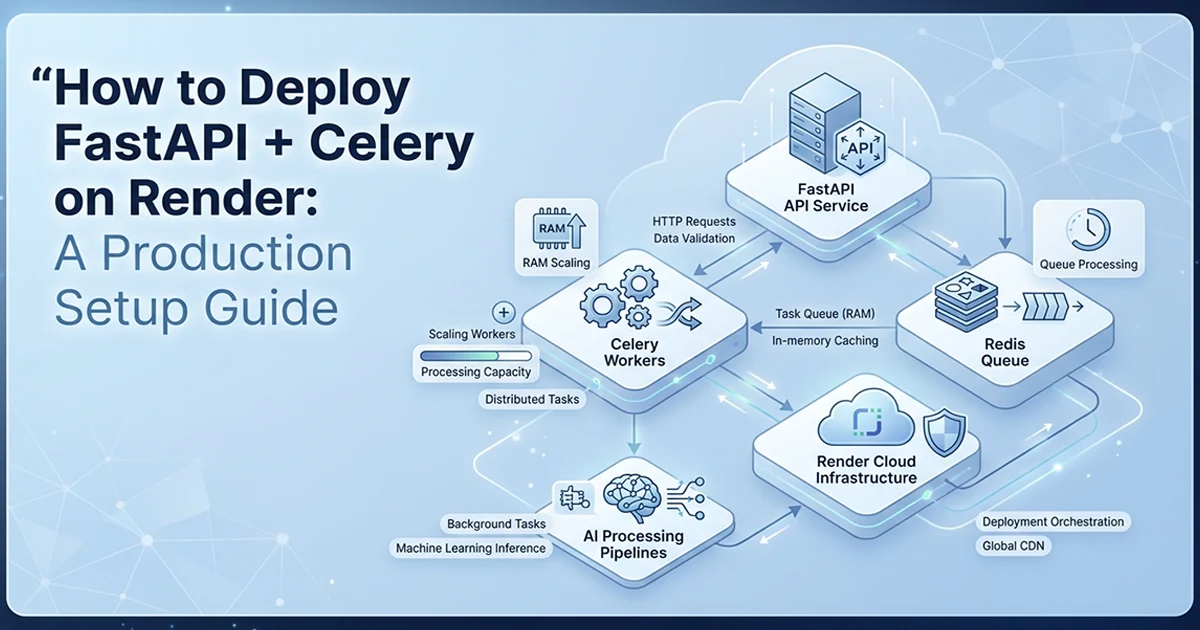
Why Render for a FastAPI + Celery AI SaaS in 2026
Render gives each service its own Docker container with independently configurable RAM — critical when the API needs 512 MB but a long-running AI worker needs 2 GB, which would be impossible to tune on a single-process deployment.
See also: FastAPI + Celery + Redis architecture and Stripe webhooks triggering Celery AI jobs.
I deployed an AI report generation SaaS on Render with five services: one FastAPI web API and four Celery workers, each on its own queue. External dependencies — MongoDB Atlas, Upstash Redis, Vercel Blob, SendGrid, Stripe, OpenAI — connect via environment variables in a shared group called pulseclarity-shared. One group means one place to update API keys across all five services simultaneously. No Procfile. No platform-specific runtime hacks. One render.yaml file defines the entire infrastructure.
The key Render advantages for Python AI SaaS: per-service resource isolation, Docker-native deployment, managed Redis option, env group sharing across all services, and render.yaml as infrastructure as code committed to your repository. When I update a Dockerfile or change a worker plan, I push to git — Render redeploys the affected services automatically.
| Render | Railway | Fly.io | AWS Lambda | Vercel | |
|---|---|---|---|---|---|
| Python AI SaaS fit | ✅ Excellent | ✅ Good | ✅ Good | ⚠️ Complex | ❌ No Python workers |
| Celery workers | ✅ Native service type | ✅ Via Dockerfile | ✅ Via Fly Machine | ❌ 15-min limit | ❌ Not supported |
| Managed Redis | ✅ Built-in | ✅ Built-in | ✅ Via Upstash | ✅ Via ElastiCache | ❌ External only |
| Per-service RAM config | ✅ Per service | ✅ Per service | ✅ Per machine | ✅ Per function | N/A |
| Infrastructure as code | render.yaml | railway.json | fly.toml | CDK/SAM | vercel.json |
| Cold starts | ⚠️ Starter plan | ✅ No cold starts | ✅ No cold starts | ✅ Managed | ✅ Edge functions |
| Monthly cost (5 services) | ~$21–$42 | Similar | Similar | Pay per invocation | N/A |
| Best for | Multi-service Python AI | Simple Python APIs | High-traffic APIs | Event-driven | Node.js/Next.js |
Why not Lambda, Vercel, or Railway for this stack
AWS Lambda is not built for long-running Celery workers — the 15-minute execution limit blocks AI jobs that run 141–190 minutes. You would need to rearchitect around Step Functions or separate compute, losing Celery's queue semantics entirely. Vercel excels at Next.js but has no persistent Python worker service type — Celery cannot run on Vercel Cron. Railway is a strong alternative with a cleaner dashboard, but Render's envVarGroups and native worker service type map more directly to a multi-queue Celery deployment. I chose Render because render.yaml lets me version the entire 5-service topology in one file.
The 5-Service Architecture: One API, Four Dedicated Workers
Deploy the FastAPI web server and each Celery worker as separate Render services — they share environment variables via a group but have independent resource allocations, so a memory-intensive worker does not impact the API.
My production layout:
- API (web, starter): uvicorn with
--workers 2, handles HTTP, Stripe webhooks, health checks - Life Clarity worker (starter):
queue.life_clarity, concurrency 2, ~15–20s jobs - Blueprint worker (starter):
queue.personal_blueprint, concurrency 1, ~110–136s jobs - Horoscope worker (STANDARD):
queue.personal_horoscope, concurrency 1, 141–190 min jobs, 173 WeasyPrint chunks - Bundle worker (starter):
queue.bundle, concurrency 2, lightweight coordinator
Why 4 worker services instead of 1
One Celery worker listening to all queues would allow a 4-hour Horoscope job to consume all concurrency slots — blocking 20-second Life Clarity jobs behind a 141-minute pipeline. I saw this in staging before splitting workers: a customer paid for a fast report at 3 PM and waited until the Horoscope job ahead of them finished at 7 PM. Dedicated workers ensure fast jobs are never blocked by slow jobs. Each worker has its own Docker container, its own RAM allocation, and its own Celery concurrency setting tuned to the job profile.
Plan selection per service
Starter plan: 512 MB RAM, 0.5 CPU — sufficient for the API and most workers. Standard plan: 2 GB RAM, 1 CPU — required for the Horoscope worker. Peak RAM during 173-chunk WeasyPrint PDF assembly hits ~1.5–2 GB. Starter's 512 MB causes an immediate OOM crash — not at startup, but partway through the PDF render, leaving the customer with a failed job and no delivery.
Do NOT put the Horoscope worker on starter plan. 512 MB RAM → OOM crash during the 173-chunk WeasyPrint PDF assembly. The OOM is not predictable — it happens partway through the render, leaving the customer with a failed job and no delivery. Standard plan (2 GB RAM) is the minimum for any worker that assembles large PDFs in memory.
The render.yaml File: Infrastructure as Code for All 5 Services
In this deploy FastAPI Celery Render production guide 2026, render.yaml defines all services, plans, Dockerfiles, and environment variable groups in one committed file — deploy all 5 services with one push, with secrets staying safely in the Render dashboard via sync: false.
No Procfile. render.yaml is the only deployment config. All five services reference the same envVarGroup — update an API key once in the Render dashboard, all services pick it up on next deploy.
# render.yaml — infrastructure as code for 5 services

services:
  # Web service: FastAPI API with health check
  - type: web
    name: ai-saas-api
    plan: starter          # 512 MB — HTTP only, no heavy compute
    dockerfilePath: ./Dockerfile.api
    dockerContext: .
    healthCheckPath: /api/v1/health   # must match your FastAPI route exactly
    envVarGroups:
      - shared-config

  # Fast worker — parallel AI calls, low RAM per job
  - type: worker
    name: ai-saas-worker-fast
    plan: starter
    dockerfilePath: ./Dockerfile.worker.fast
    dockerContext: .
    envVarGroups:
      - shared-config

  # Medium worker — sequential calls, moderate duration
  - type: worker
    name: ai-saas-worker-medium
    plan: starter
    dockerfilePath: ./Dockerfile.worker.medium
    dockerContext: .
    envVarGroups:
      - shared-config

  # Long worker — MUST be standard: 2 GB RAM for WeasyPrint PDF assembly
  - type: worker
    name: ai-saas-worker-long
    plan: standard           # 2 GB RAM — non-negotiable for 173-chunk PDFs
    dockerfilePath: ./Dockerfile.worker.long
    dockerContext: .
    envVarGroups:
      - shared-config

  # Bundle coordinator — lightweight task dispatch
  - type: worker
    name: ai-saas-worker-coordinator
    plan: starter
    dockerfilePath: ./Dockerfile.worker.coordinator
    dockerContext: .
    envVarGroups:
      - shared-config

# Shared secrets — values set in Render dashboard, NOT committed
envVarGroups:
  - name: shared-config
    envVars:
      - key: REDIS_URL
        sync: false            # set in dashboard — never commit
      - key: OPENAI_API_KEY
        sync: false
      - key: SENDGRID_API_KEY
        sync: false
      - key: SENDGRID_FROM_EMAIL
        sync: false
      - key: STRIPE_SECRET_KEY
        sync: false
      - key: STRIPE_WEBHOOK_SECRET
        sync: false
      - key: BLOB_READ_WRITE_TOKEN
        sync: false
      - key: MONGO_DB_URI
        sync: false
      - key: MONGO_DB_USERNAME
        sync: false
      - key: MONGO_DB_PASSWORD
        sync: false
      - key: MONGO_DB_NAME
        sync: false
      - key: FRONTEND_URL
        sync: false
      - key: APP_ENV
        value: production      # non-secret — safe to commit with sync: true
sync: false vs sync: true — the critical distinction
sync: false: the value is set in the Render dashboard, NOT stored in render.yaml. Your repository contains the key name only — no secret value. sync: true: the value is committed to render.yaml and thus to git history. NEVER use sync: true for secrets. ALWAYS use sync: false for API keys, database credentials, and webhook secrets. Only non-sensitive values like APP_ENV=production belong in the committed file.
If you accidentally commit a secret with sync: true, rotate the secret immediately and use git to remove it from history. The render.yaml in your repo is public or accessible to all team members — treat it the same way you treat your .env file: no real secrets, ever.
The Dockerfiles: API vs Workers — One Key Difference
The API Dockerfile runs uvicorn; each worker Dockerfile runs the same Celery command but with a different --queues flag — and all Dockerfiles must include WeasyPrint's system dependencies or PDF rendering fails silently on Docker.
The WeasyPrint system dependencies gotcha
WeasyPrint imports successfully without system libraries — then raises cairo errors on the first PDF render. On a fresh python:3.11-slim image, you get a cryptic stack trace halfway through a customer's 141-minute job, after 161 GPT-4o calls and ~$15 in API spend already consumed. Install libcairo2, libpango, libgdk-pixbuf, libffi-dev, and shared-mime-info in every Dockerfile — API and all workers — even if only one worker generates PDFs. Any service that imports the PDF module needs these packages.
# Dockerfile.api

FROM python:3.11-slim

WORKDIR /app

# WeasyPrint requires these system libraries — without them, WeasyPrint
# imports successfully but raises cairo errors on the first PDF render
RUN apt-get update && apt-get install -y \
    libcairo2 \
    libpango-1.0-0 \
    libpangocairo-1.0-0 \
    libgdk-pixbuf2.0-0 \
    libffi-dev \
    shared-mime-info \
    && rm -rf /var/lib/apt/lists/*   # keep image size small (~50-100 MB saved)

COPY requirements.txt .
RUN pip install --no-cache-dir -r requirements.txt

COPY . .

# Web service: uvicorn with 2 workers (web concurrency, not Celery)
CMD ["uvicorn", "app.main:app", "--host", "0.0.0.0", "--port", "8000", "--workers", "2"]
The worker Dockerfiles — only the CMD differs
Each worker Dockerfile is nearly identical to Dockerfile.api — same base image, same WeasyPrint deps, same pip install. The only difference is the Celery CMD:
# Fast worker — concurrency 2: 2 parallel fast jobs fine (low RAM per job)
CMD ["celery", "-A", "app.workers.celery_app", "worker",
     "--queues=queue.life_clarity", "--concurrency=2", "--loglevel=info"]

# Medium worker — concurrency 1: sequential for reliable memory management
CMD ["celery", "-A", "app.workers.celery_app", "worker",
     "--queues=queue.personal_blueprint", "--concurrency=1", "--loglevel=info"]

# Long worker — concurrency 1: NON-NEGOTIABLE
# concurrency=2 → 2 jobs simultaneously → OOM crash
# Peak RAM: ~1.5-2 GB per job during 173-chunk WeasyPrint assembly
CMD ["celery", "-A", "app.workers.celery_app", "worker",
     "--queues=queue.personal_horoscope", "--concurrency=1", "--loglevel=info"]

# Coordinator worker — concurrency 2: lightweight, just dispatches sub-tasks
CMD ["celery", "-A", "app.workers.celery_app", "worker",
     "--queues=queue.bundle", "--concurrency=2", "--loglevel=info"]

# ── DRY alternative: one Dockerfile with build args ──
# ARG QUEUE_NAME
# ARG CONCURRENCY=1
# CMD celery -A app.workers.celery_app worker \
#     --queues=${QUEUE_NAME} --concurrency=${CONCURRENCY} --loglevel=info
# Pass QUEUE_NAME and CONCURRENCY per service in render.yaml dockerBuildArgs
The rm -rf /var/lib/apt/lists/* step in the apt-get RUN command is not optional for production. apt-get list files add ~50–100 MB to the image. For a stack with 5 Dockerfiles sharing the same base layers, skipping cleanup bloats every build and slows deploys.
Setting Up Redis on Render for Celery
Use Upstash for production Redis — it is serverless, persistent, and portable across platforms; Render's managed Redis is a good alternative for services staying entirely within the Render ecosystem.
Celery uses Redis as both broker and result backend. Every worker and the API need the same REDIS_URL — configured once in the shared env group.
Option A — Render managed Redis
Add a databases section to render.yaml:
databases:
  - name: ai-saas-redis
    type: redis
    plan: starter
    ipAllowList: []   # open to all services on Render's internal network

# Reference in envVarGroups:
#   - key: REDIS_URL
#     fromDatabase:
#       name: ai-saas-redis
#       property: connectionString
Advantage: stays on Render's internal network — no public internet exposure, no TLS configuration between services. Disadvantage: Render Redis is newer with limited persistence options, and it is tied to your Render account.
Option B — Upstash (recommended for production portability)
Upstash: serverless Redis, pay-per-request, generous free tier, TLS enabled, data persistence. Setup: Upstash console → create Redis → copy TLS URL → paste as REDIS_URL in Render dashboard. Format: rediss://default:password@hostname:port. Celery config for TLS:
# app/workers/celery_app.py

broker_use_ssl = {"ssl_cert_reqs": None}  # required for rediss:// URLs
I use Upstash in production. If I migrate from Render to Railway or Fly.io, Redis does not need to migrate — only the REDIS_URL env var stays the same. Render managed Redis is simpler for Render-only setups; Upstash is better when platform portability matters. Celery also needs acks_late=True and reject_on_worker_lost=True on tasks — unrelated to Redis setup but critical once workers are running on separate containers that can restart independently.
Render's killer feature for Python AI apps isn't the pricing — it's that each service gets its own Docker container with independently configurable RAM. The Horoscope worker needs 2 GB. The API needs 512 MB. On Render, that's two lines in render.yaml. On Lambda or a monolithic server, it's a different architecture entirely.
Health Checks, Cold Starts, and Keeping Your API Always On
The health check endpoint must return 200 fast and independently of database state — and starter-plan web services spin down after 15 minutes of inactivity, so production AI SaaS APIs need the Standard plan or an external keepalive.
The health check endpoint
Route: GET /api/v1/health. Returns {"status": "ok", "service": "pulseclarity-api"}. Render polls this endpoint via healthCheckPath in render.yaml. If it returns non-200, Render marks the deployment as failed.
Do NOT add MongoDB or Redis connectivity checks to the health endpoint. If MongoDB is briefly slow during Atlas maintenance, a health check that queries the database times out → Render marks the service unhealthy → restart → restart loop. The health endpoint should only verify the FastAPI app process is running and responding.
Startup resilience matters too. In app/core/lifespan.py, connection failures to MongoDB or Redis log warnings but do not crash the app. On Render, services start concurrently — a worker may boot before Redis is fully ready. Graceful startup prevents cascade failures across all five services.
Cold starts and Stripe webhooks
Render starter-plan web services spin down after 15 minutes of inactivity. Next request: 30–60 second cold start while Docker restarts the container. Worker services do NOT spin down — they run continuously.
The Stripe webhook cold start problem: if the web service is cold when Stripe delivers a checkout.session.completed webhook, the 30–60 second cold start means Stripe gets a timeout → marks delivery failed → retries later. On retry, the service is warm → works fine. The idempotency check handles the duplicate delivery correctly — no double job dispatch. But the initial cold start creates a gap in service that looks like a bug to the customer waiting for confirmation.
Fix: Standard+ plan with "Always On" enabled, or an external uptime monitor pinging /api/v1/health every 5 minutes to prevent spin-down. For production AI SaaS handling payment webhooks, cold starts on the API are not acceptable. I use a free uptime monitor that hits the health endpoint every 4 minutes — cheap insurance against Stripe webhook timeouts on the starter plan while the API service is still on starter during early development.
Worker services don't cold start
Background worker services on Render run continuously — no spin-down, no cold start. A Horoscope job dispatched at 2 AM finds the worker already running, picks up the task immediately, and runs for 141–190 minutes without interruption. Only the web service (API) has the spin-down issue. Hassan Raza documents the full stack — Celery queues, Stripe webhooks, PDF generation, email delivery — across the AI Engineering series on hassanr.com.
Honest current state: no persistent disk configured. Temporary PDF files before Vercel Blob upload live in container ephemeral storage. If the container restarts mid-generation, temp files are lost — but Celery retries the task, which resumes from MongoDB checkpoints. No auto-scaling configured — each worker is single-instance. For horizontal scaling, duplicate the worker service in render.yaml with the same queue and concurrency settings.
Frequently Asked Questions
Use render.yaml to define a web service and separate worker services with Docker. The web service uses a Dockerfile with uvicorn — add a healthCheckPath like /api/v1/health. Each Celery worker gets its own worker service with a Dockerfile that differs only in the --queues and --concurrency flags. Share environment variables via an envVarGroup and set sync: false for all secrets — values go in the Render dashboard, not your repository. Include WeasyPrint system dependencies in every Dockerfile if you generate PDFs. Set heavy PDF workers to Standard plan (2 GB RAM minimum).
Use Render managed Redis or external Upstash — both work with Celery. For Render managed Redis, add a databases section in render.yaml and reference the connection string via fromDatabase.property in your env group — no TLS config needed on Render's internal network. For Upstash, create a serverless Redis instance, copy the TLS URL (rediss://), set it as REDIS_URL in the Render dashboard, and configure broker_use_ssl in Celery. Upstash is recommended for production portability — if you migrate off Render, your Redis stays unchanged.
It depends on your workload — Render leads for multi-service Python AI SaaS with Celery. Render offers render.yaml infrastructure as code and per-service RAM allocation. Railway is a close second with a cleaner UI. Fly.io suits high-traffic global APIs. AWS Lambda works for event-driven workloads but not long-running Celery workers — the 15-minute execution limit blocks hours-long AI jobs. Vercel excels at Node.js and Next.js but does not support persistent Python background workers.