
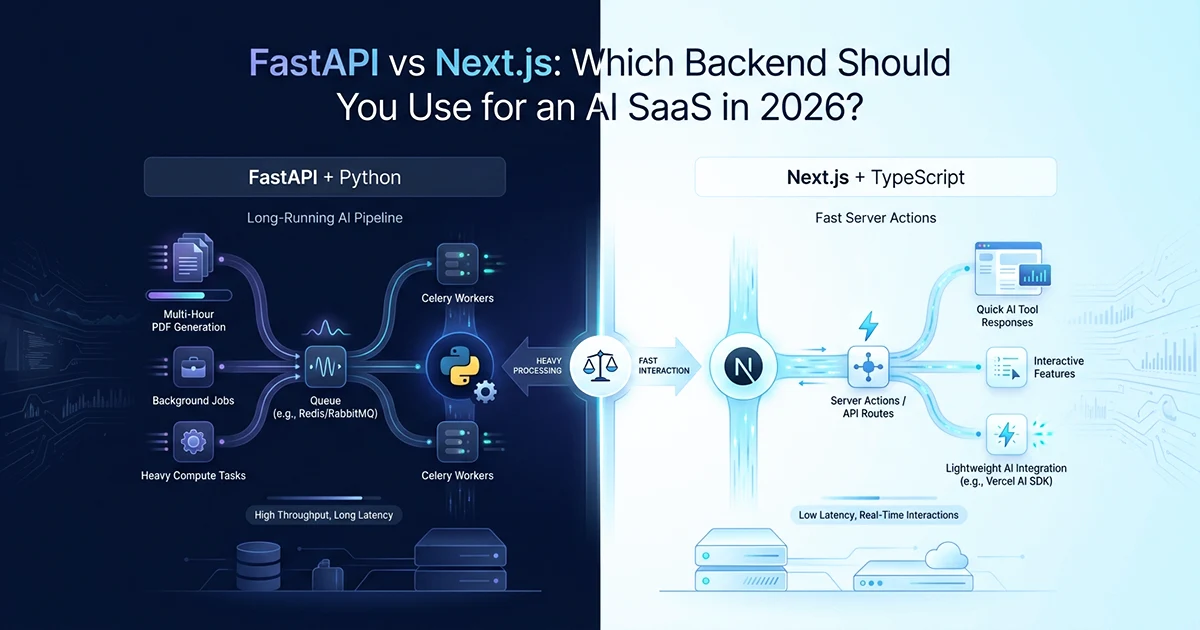
Two Real AI SaaS Products, Two Stacks — What Each One Actually Does
The right backend for an AI SaaS depends on job duration, Python library requirements, and whether your product is a web application or a pure API — not on which framework is more popular in 2026.
See also: FastAPI + Celery production AI stack and Next.js multi-tenant SaaS with Prisma.
Project A — AI report generation SaaS (FastAPI + Python): FastAPI 0.128.7, Python 3.11, MongoDB Atlas, Redis + Celery, OpenAI gpt-4o, WeasyPrint PDFs, Stripe, SendGrid, Vercel Blob. Three products with radically different AI runtimes: four parallel OpenAI Agents SDK calls (~15–20s), 52 sequential chat completions in 5-wide batches (~110–136s), and 161 sequential calls producing 8,620 answers and a 1,725-page PDF (~141–190 min). Five Render services — one API plus four Celery workers plus a fifth bundle worker. 105 Python files across 21 pinned dependencies in requirements.txt. Cost per Horoscope report: ~$15–25 at production scale.
Project B — Affiliate marketing SaaS (Next.js + TypeScript): Next.js 16.0.8, React 19, PostgreSQL + Prisma 7, NextAuth v5, Google Gemini (text + image), Tailwind CSS 4, shadcn/ui. The product is the web app — dashboard, link builder, image editor, admin panel, sales analytics. Ten AI tools, nine with Gemini calls — all via Server Actions under 30 seconds each. Vercel Cron for hourly sales sync across six affiliate networks. No PDF output. 286 TypeScript/TSX files (~58,600 lines in src/). Single Vercel deployment with zero separate worker processes. Cost per AI tool call: fractions of a cent on Gemini 2.5 Flash.
Same developer, same year, same goal — ship production AI SaaS. The stacks diverged because the workloads diverged: variable documents over hours versus a dashboard calling AI APIs in seconds.
Why these two projects ended up on different stacks
The decision was not "I prefer Python" or "I prefer TypeScript." Project A needed kerykeion — an astrology domain library with no Node.js equivalent — and jobs running for hours. Project B needed a web app dashboard with auth, admin panel, image editor, and AI tools co-located with the UI. Different requirements → different stacks. Neither was wrong for its problem.
Project A is a pure API backend with a separate React frontend — Stripe webhooks, HTTP 202, Celery dispatch. Project B is the product itself: Server Actions replace a REST API layer. 105 Python files versus 286 TypeScript files reflects backend-only versus full-stack scope, not inherent complexity.
The framework is not the decision. Answer three questions first: How long do your AI jobs run? Do you need Python-native libraries? Is your product a web app or a pure API? Jobs over 10 minutes, Python domain libs, or variable document output → lean FastAPI + Celery. Dashboard with short AI tools and relational data → lean Next.js + Server Actions. Many products need both.
Background Jobs: Celery Workers vs Vercel Cron — Two Different Categories
Celery with dedicated workers handles hours-long AI pipelines with crash recovery and per-task time limits; Vercel Cron handles periodic tasks under 5 minutes with zero infrastructure overhead but no crash recovery.
The FastAPI project's Celery setup
Five Render services. Four worker queues — one per product plus a bundle worker that coordinates multi-report orders. Horoscope worker: soft_time_limit=21_600 (6 hours), time_limit=22_500 (6.25 hours). Global defaults for short tasks: 600s soft / 660s hard — fine for 15–20s Life Clarity jobs, fatal for 141–190 minute Horoscope runs without per-task overrides. acks_late=True + reject_on_worker_lost=True → tasks re-queue on crash instead of vanishing silently.
MongoDB stores section-level checkpoints — crash at batch 140 of 161, restart from batch 141 with no repeated API calls. A 190-minute job cannot trust a single serverless invocation to survive.
# app/workers/tasks.py

from celery.exceptions import SoftTimeLimitExceeded

from app.workers.celery_app import celery_app


# Short job — global defaults (600s soft / 660s hard) are sufficient
@celery_app.task(
    name="app.workers.tasks.generate_report",
    bind=True,
    max_retries=2,
    acks_late=True,              # message stays in Redis until success
    reject_on_worker_lost=True,  # re-queue if worker dies mid-task
    queue="queue.life_clarity",
)
def generate_report(self, session_id: str, metadata: dict) -> None:
    try:
        run_fast_pipeline(session_id, metadata)  # ~15-20s, 4 parallel agents
    except SoftTimeLimitExceeded:
        update_status(session_id, "failed")


# Long job — without these overrides, global 600s kills a 141-190 min job
@celery_app.task(
    name="app.workers.tasks.generate_long_report",
    bind=True,
    max_retries=2,
    acks_late=True,
    reject_on_worker_lost=True,
    soft_time_limit=21_600,    # 6 hours — SoftTimeLimitExceeded warning shot
    time_limit=22_500,         # 6.25 hours — SIGKILL, no cleanup
    default_retry_delay=60,
    queue="queue.personal_horoscope",
)
def generate_long_report(self, session_id: str, metadata: dict) -> None:
    try:
        run_long_pipeline(session_id, metadata)  # 161 calls, 8,620 answers
    except SoftTimeLimitExceeded:
        # 900s gap (22,500 - 21,600) = 15 min to persist state before SIGKILL
        update_status(session_id, "failed")
        raise
    except Exception as exc:
        raise self.retry(exc=exc, countdown=60 * (2 ** self.request.retries))
The Next.js project's Vercel Cron setup
Single endpoint: GET /api/cron/sync-sales. maxDuration: 300 (5 min). Runs hourly. No separate worker process. No Dockerfile. No Render dashboard. Protected by CRON_SECRET or Vercel's x-vercel-cron header. The job pulls sales data from six affiliate networks, normalizes it, and upserts into PostgreSQL — typically completing in under two minutes.
If it fails: logs an error, retries on the next hourly schedule — acceptable for idempotent sales sync, catastrophic for a 161-batch pipeline where batch 140 already cost $12 in API calls. Zero separate worker processes — Vercel Cron is the entire background infrastructure.
If your AI job runs over 10 minutes, Vercel Cron and Next.js API routes are the wrong tool — regardless of the maxDuration setting. You need a dedicated worker process (Celery, BullMQ, Inngest) running independently of the web server. The failure mode of a Cron-based long job is silent timeout with no crash recovery — MongoDB stays at generating, the customer gets nothing.
AI API Integration: Python Ecosystem vs TypeScript Ecosystem
Choose Python when your AI pipeline depends on Python-native libraries or the OpenAI Agents SDK's asyncio integration; choose TypeScript when you use Gemini or OpenAI for text/image generation and want full-stack type safety from the AI response to the React component.
The FastAPI project's AI pipeline
OpenAI Agents SDK (from agents import Agent, Runner) — Python-native, designed for asyncio. Four parallel agents via asyncio.gather for Life Clarity (~15–20s). Blueprint runs 52 sequential chat completions in 5-wide batches (~110–136s). Horoscope runs 161 sequential chat completions producing 8,620 answers (141–190 min). Before any GPT call, kerykeion computes natal charts and transits — domain calculations that have no Node.js equivalent and would require reimplementing ephemeris math in TypeScript.
Tenacity handles retries: 3 attempts, exponential backoff 4–60s on 429/500/503. gpt-4o is hardcoded in production — model switching in a 161-call pipeline is a cost decision, not a runtime toggle. Cost: ~$15–25 per Horoscope report — a workload cost, not a framework cost.
# app/services/ai/retry.py

import logging

from openai import AsyncOpenAI, RateLimitError, APIStatusError
from tenacity import (
    retry,
    retry_if_exception_type,
    stop_after_attempt,
    wait_exponential,
    before_sleep_log,
)

logger = logging.getLogger(__name__)
client = AsyncOpenAI()


@retry(
    retry=retry_if_exception_type((
        RateLimitError,
        APIStatusError,
        ConnectionError,
    )),
    wait=wait_exponential(multiplier=2, min=4, max=60),
    stop=stop_after_attempt(3),
    before_sleep=before_sleep_log(logger, logging.WARNING),
)
async def call_gpt4o(system_prompt: str, user_prompt: str) -> str:
    response = await client.chat.completions.create(
        model="gpt-4o",  # hardcoded — not read from env; use gpt-4o-mini locally only
        messages=[
            {"role": "system", "content": system_prompt},
            {"role": "user", "content": user_prompt},
        ],
        max_tokens=12_000,
        temperature=0.8,
    )
    return response.choices[0].message.content


# Life Clarity: parallel execution via asyncio.gather
# results = await asyncio.gather(*[call_gpt4o(sys, p) for p in prompts])
The Next.js project's AI pipeline
Vercel AI SDK (@ai-sdk/google) for text, @google/genai for images. generateTextWithSchema<T>(): prompt-based JSON extraction — system prompt instructs "Return ONLY valid JSON", response stripped of markdown fences, regex extracts first JSON object, typed as T. Retry logic and rate limiting live in src/lib/ai/gemini.ts, not scattered across 10 tool components.
Per-user rate limiting: 30 req/min sliding window, image cooldown 3s, request locking — all wired into a shared Server Action wrapper reused by every tool. Gemini 2.5 Flash costs fractions of a cent per call versus ~$15–25 per Horoscope on gpt-4o — a workload comparison, not a framework one.
// src/features/tools/actions/run-tool.ts

'use server';

import { auth } from '@/lib/auth';
import { checkRateLimit } from '@/lib/ai/rate-limit';
import { acquireLock, releaseLock } from '@/lib/ai/request-lock';
import { validateWithZod } from '@/lib/validation';
import type { ZodSchema } from 'zod';
import type { ActionResponse } from '@/types/actions';

export async function runToolAction<TInput, TOutput>(
  inputSchema: ZodSchema<TInput>,
  outputSchema: ZodSchema<TOutput>,
  input: unknown,
  service: (data: TInput, userId: string) => Promise<TOutput>,
): Promise<ActionResponse<TOutput>> {
  // Gate 1: auth — fail fast before any rate limit or AI cost
  const session = await auth();
  if (!session?.user?.id) {
    return { success: false, error: 'Unauthorized' };
  }
  const userId = session.user.id;

  // Gate 2: rate limit — before validation so abusive traffic is cheap to reject
  const rateCheck = await checkRateLimit(userId);
  if (!rateCheck.allowed) {
    return { success: false, error: 'Rate limit exceeded', retryAfter: rateCheck.retryAfter };
  }

  // Gate 3: lock — prevent double-click duplicate AI calls
  const locked = await acquireLock(userId);
  if (!locked) {
    return { success: false, error: 'Request already in progress' };
  }

  let succeeded = false;
  try {
    // Gate 4: validate input, call service (AI happens here), validate output
    const parsed = validateWithZod(inputSchema, input);
    if (!parsed.success) return { success: false, error: parsed.error };

    const result = await service(parsed.data, userId);
    const validated = validateWithZod(outputSchema, result);
    if (!validated.success) return { success: false, error: validated.error };

    succeeded = true;
    return { success: true, data: validated.data };
  } finally {
    await releaseLock(userId, succeeded);
  }
}
If you are using the Vercel AI SDK with Next.js Server Actions, the 4-gate pattern (auth → rate limit → validate → execute) is the cleanest way to protect AI endpoints. Each gate returns early on failure — the AI call is only reached if every gate passes. This pattern scales to 10+ tools without duplicating auth or rate-limit logic.
MongoDB vs PostgreSQL: Match the Database to the Data Shape
MongoDB fits variable AI output shapes that differ per product; PostgreSQL fits structured relational domains where foreign keys, constraints, and end-to-end type safety matter more than schema flexibility.
Why MongoDB for the AI report SaaS
Each product generates a different document shape: Life Clarity has 9 sections with title + body. Blueprint has 52 Q&A pairs in sections[]. Horoscope has 8,620 answers across 161 batches with per-batch metadata — batch number, completion timestamp, token count, retry count. A single PostgreSQL schema cannot represent all three without nullable columns on nearly every field and migration hell every time a new report type adds a field.
MongoDB: each report type stores the shape it needs. Crash recovery upserts individual sections as they complete — batch 140 persists immediately; a crash at batch 141 loses one in-flight call, not 140 completed batches.
Why PostgreSQL for the affiliate SaaS
The domain is inherently relational: User → AffiliateNetworkAccount (@@unique userId+network) → AffiliateSale (@@unique userId+network+externalOrderId) → Link (unique alias) → Click → Conversion. Foreign keys prevent orphaned records — a sale cannot reference a network account that does not exist. @@unique constraints enforce business rules at the database layer, not just in application code.
Prisma generates a fully typed client. Zod validates Server Action inputs. @t3-oss/env-nextjs validates env at build time. The type chain from PostgreSQL → Prisma → Server Action → React component is unbroken across 286 TypeScript files — a gap FastAPI's Pydantic cannot close without OpenAPI codegen on the frontend.
Deployment: Zero Config vs Full Control
Next.js on Vercel is a single git push; FastAPI on Render with 5 services and 4 worker Dockerfiles gives fine-grained resource control at the cost of meaningful operational overhead.
FastAPI on Render — 5 services, 4 Dockerfiles
render.yaml defines 5 services sharing a common env group. Horoscope worker: standard plan (≥2 GB RAM — WeasyPrint renders 173 PDF chunks into a single ~14 MB file). Other workers: starter plan. Each worker has its own CMD, concurrency setting, and Dockerfile. You can give the Horoscope worker 6-hour time limits and 2 GB RAM while the Life Clarity worker runs on a $7/month starter instance — per-product resource allocation that Vercel's uniform function model cannot replicate.
Production-grade control — 5 services to monitor, 4 Dockerfiles to maintain. When a 1,725-page PDF render strains memory, you want to know which container is struggling.
Next.js on Vercel — single deployment
Zero config. No Dockerfiles. No worker management. Cron configured in host settings — production schedule set in Vercel dashboard, not committed to the repo. Single git push deploys the API routes, Server Actions, React components, and cron handlers together. Vercel handles CDN, edge routing, function scaling automatically. One deployment versus five Render services. One bill versus five service lines plus Redis plus MongoDB Atlas.
The trade-off: Vercel's execution model — function timeouts, no persistent workers, Cron as the only background mechanism. 21,600s Celery soft limit vs 300s maxDuration is the starkest difference. Uniform function RAM works for 10 tools under 30s; it blocks a 1,725-page PDF render.
FastAPI vs Next.js for AI SaaS: The Full Comparison
Neither stack is universally better — this FastAPI vs Next.js AI SaaS backend comparison 2026 comes down to job duration, Python library requirements, and product shape. FastAPI wins on long-running AI pipelines and the Python ecosystem. Next.js wins on full-stack DX, deployment simplicity, and web application co-location.
| Dimension | FastAPI + Python | Next.js + TypeScript |
|---|---|---|
| Max AI job duration | Hours (Celery: 21,600s soft limit) | ~5 min (Vercel Cron maxDuration: 300s) |
| Background jobs | Celery workers — dedicated processes, crash recovery, per-task limits | Vercel Cron — periodic tasks, no crash recovery, simpler ops |
| AI ecosystem | Full Python ecosystem (OpenAI Agents SDK, kerykeion) — no Node equivalent for domain libs | Vercel AI SDK, @google/genai — best for text/image; no Python-native domain libs |
| Database used | MongoDB — document model fits variable AI output shapes per product | PostgreSQL + Prisma — relational model, typed queries, end-to-end type safety |
| Type safety | Pydantic v2 for API layer; frontend types maintained separately | TypeScript end-to-end — DB → Server Action → component, unbroken |
| Deployment | 5 Render services, 4 Dockerfiles, per-worker resource control | 1 Vercel deployment, zero config, no Dockerfiles |
| Full-stack DX | Separate frontend required; no co-location | Server Actions co-locate AI calls with UI — no separate API layer |
| Cost per AI call | ~$15–25 per Horoscope report (gpt-4o, 161 calls) | Fractions of a cent per Gemini tool call |
| Best for | Long-running AI pipelines, Python-native libraries, pure API backends | Web app dashboards with AI tools, short AI calls, single-deployment simplicity |
FastAPI and Next.js aren't competing on the same axis. FastAPI is infrastructure for AI workloads that need Python and run for hours. Next.js is a full-stack platform for web applications that happen to call AI APIs. I've built both. The question is never "which is better" — it's "which one matches the shape of the work that needs to be done."
Real production AI SaaS products often have two layers: Python backend for AI pipelines and domain calculations, Next.js frontend for auth, dashboard, and user-facing tools. The affiliate SaaS could call a Python microservice for any calculation needing the Python ecosystem. The AI report SaaS has a React frontend completely separate from the FastAPI backend. Hassan Raza documents both stacks in depth on hassanr.com — Celery reliability, Stripe webhooks, Server Actions, and Vercel Cron each have dedicated posts.
Frequently Asked Questions
Choose based on job duration, Python library needs, and whether your product is a web app or pure API. Hassan Raza built a FastAPI AI report SaaS with 141–190 minute jobs across 5 Celery workers, and a Next.js affiliate SaaS with 10 AI tools under 30 seconds each via Server Actions. Jobs over 10 minutes need Celery workers, not Vercel Cron. Python-native libraries like kerykeion force FastAPI. Web dashboards with auth co-locate better on Next.js. Many production AI SaaS products use both — Python for the AI backend, Next.js for the frontend.
FastAPI is a Python async API framework; Next.js is a full-stack React framework with Server Actions. FastAPI needs a separate frontend and excels at long-running Celery pipelines with the Python AI ecosystem — OpenAI Agents SDK, domain libraries. Next.js co-locates backend logic with React components, integrates Vercel AI SDK and Gemini, and deploys as a single Vercel git push. FastAPI handles hours-long background jobs with per-task time limits; Next.js plus Vercel Cron handles periodic tasks under 5 minutes. Neither is universally better — they serve different architectures.
Yes, when AI calls finish in under 30 seconds and you don't need Python-native libraries. Hassan Raza runs 10 AI tools through Next.js Server Actions on Vercel — text and image generation via Gemini, per-user rate limiting, zero separate worker processes. Next.js cannot run 141-minute jobs — function timeout limits block hours-long pipelines. It cannot access Python-native science libraries. For those needs, add a Python microservice as a separate backend. Next.js as the full stack fits web-first AI tools; the limits are job duration and Python dependencies.