
The 80/20 Rule That Makes AI Support Economically Viable
Most small business support queues have 80% repetitive questions answerable from a knowledge base — automating these frees agents for the 20% that actually needs them.
See also: Claude structured output for classification.
Every small business owner recognizes the pattern. The same 10–15 questions arrive daily: business hours, password resets, order tracking, refund policy, international shipping. Agents answer them on autopilot — but autopilot still costs salary hours. The genuinely complex 20% — billing disputes, order problems, technical edge cases, emotionally charged complaints — need a human who is not burnt out from answering "What are your hours?" for the fifteenth time that week.
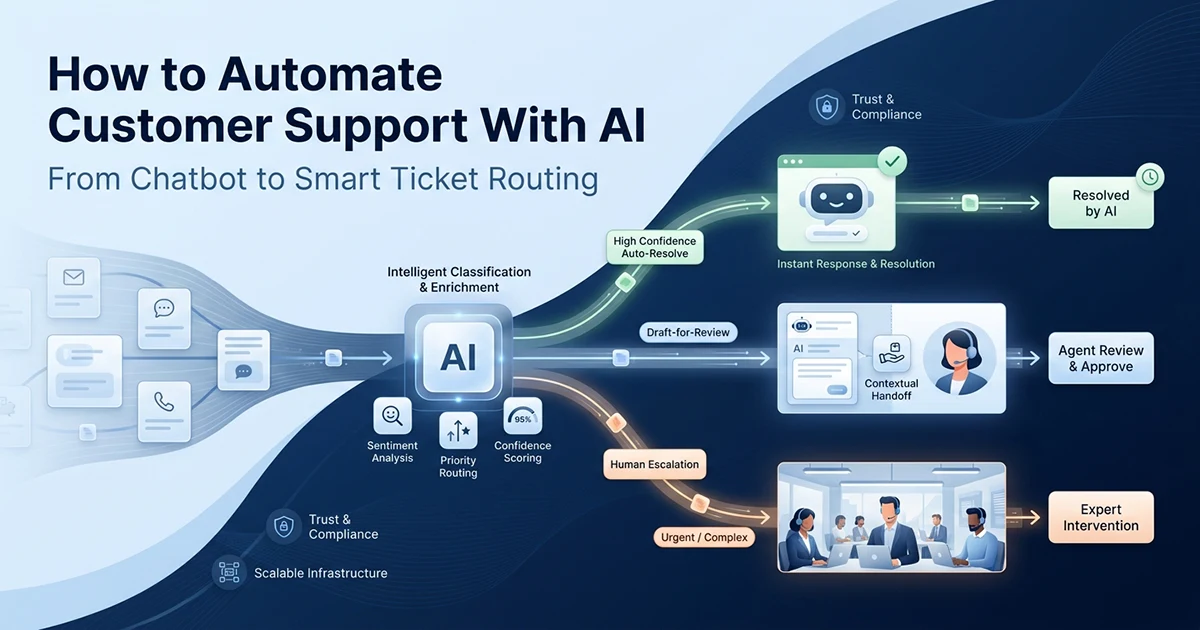
The AI opportunity is filtration, not replacement. Tier 1 auto-responds to high-confidence matches (~60% of volume). Tier 2 drafts responses for agent review (~20%). Tier 3 escalates with intent classification and a summary (~20%). Total API cost at 1000 tickets per month: roughly $5–10 — compared to the salary cost of an agent handling those same repetitive tickets manually.
| Customer sentiment | Similarity score | Tier | Action | Why |
|---|---|---|---|---|
| Angry / very angry | Any | 3 | Escalate (priority) | Hard rule — no exceptions |
| Neutral / positive | ≥ 0.82 | 1 | Auto-respond | High confidence |
| Neutral / positive | 0.65–0.82 | 2 | Draft for review | Medium confidence |
| Any | < 0.65 | 3 | Escalate + classify | Low confidence |
| Any | Any (legal mention) | 3 | Escalate (legal flag) | Hard rule |
| Any | Any (2+ past escalations) | 3 | Escalate (priority) | Hard rule |
The goal isn't to replace support agents. The goal is to make sure agents spend their time on tickets that actually need them. If 60–80% of incoming tickets can be answered automatically, your agents handle the 20% that matters — with better context, better mood, and more capacity for the complex stuff.
Never auto-respond to angry customers. This is a hard rule — not a threshold adjustment. Sentiment = "angry" always escalates to a human, regardless of how well the AI could technically answer the question. A customer who is already upset and gets an automated response becomes an ex-customer. Detect sentiment first. Escalate always.
Additional hard rules that override similarity scores: mentions of legal, lawyer, or lawsuit (escalate immediately and flag); billing disputes over a configurable dollar threshold; customers escalated two or more times previously (priority routing); media or PR inquiries (never auto-respond). These rules exist because the cost of a wrong auto-response on a high-stakes ticket far exceeds the cost of an unnecessary escalation.
The per-ticket economics make this viable for small businesses. text-embedding-3-small costs $0.02 per million tokens — roughly $0.001 to embed each incoming ticket. Claude Haiku for classification, summary, and response generation runs about $0.002–0.008 per ticket depending on length. Total: $0.005–0.01 per ticket handled. At 1000 tickets per month, that is $5–10 in API fees — a fraction of one hour of agent time.
Step 1: Building the Knowledge Base — Your FAQ as a Vector Store
Export your FAQ page or common response templates into question/answer pairs, embed the questions using text-embedding-3-small, and store them in pgvector — this becomes the retrieval foundation for all three tiers.
The knowledge base is not a chatbot personality prompt. It is a searchable library of verified answers. When a customer asks "Are you open Saturday?", the system finds the closest embedded question — "What are your business hours?" — and uses the stored answer as context for generating a response. The vector distance between the incoming ticket and stored questions determines routing confidence.
What goes in the knowledge base
Sources: your FAQ page, help docs, common email templates, and resolved tickets from the past 90 days. Format each entry as a question/answer pair: {"question": "What are your hours?", "answer": "We're open Monday–Friday, 9am–5pm EST."} Include phrasing variations — "Are you open weekends?" and "Weekend hours?" should both point to the same answer. Add multiple phrasings of the same question as separate entries sharing the same answer text.
import asyncio
import psycopg2
from openai import AsyncOpenAI

client = AsyncOpenAI()

# Expand this with your actual FAQs — aim for 50-200 Q&A pairs
KNOWLEDGE_BASE = [
    {"question": "What are your business hours?",
     "answer": "We're open Monday-Friday, 9am-5pm EST. Closed on US public holidays."},
    {"question": "How do I reset my password?",
     "answer": "Click 'Forgot Password' on the login page. You'll receive an email within 2 minutes."},
    {"question": "What is your refund policy?",
     "answer": "Full refund within 30 days of purchase, no questions asked. Email support@company.com."},
    {"question": "Where is my order?",
     "answer": "Check your tracking email or visit your account's Orders page. Delivery takes 3-5 business days."},
    {"question": "Do you offer discounts for annual plans?",
     "answer": "Yes — annual plans are billed at 20% off the monthly rate. Switch in Account Settings."},
    {"question": "Are you open on Saturday?",
     "answer": "We're open Monday-Friday, 9am-5pm EST. Closed on US public holidays."},
    {"question": "What time do you close?",
     "answer": "We close at 5pm EST on weekdays. Closed on US public holidays."},
    # ... add 50-200 more Q&A pairs with phrasing variations
]


async def build_knowledge_base(conn: psycopg2.extensions.connection) -> None:
    """Embed all FAQ questions and store in pgvector."""
    questions = [item["question"] for item in KNOWLEDGE_BASE]
    embeddings = await embed_texts(questions)  # text-embedding-3-small, 1536 dims

    for i, (item, embedding) in enumerate(zip(KNOWLEDGE_BASE, embeddings)):
        insert_document(
            conn=conn,
            content=item["answer"],
            embedding=embedding,
            metadata={"question": item["question"], "faq_id": i},
        )
    print(f"Knowledge base built: {len(KNOWLEDGE_BASE)} FAQs embedded")
How many FAQs do you need?
50 FAQs covering the 10 most common questions with 5 phrasing variations each is enough for most small businesses. The key is coverage of phrasing variations, not raw count. Start with 50 entries, measure the escalation rate after two weeks, and add FAQs for patterns that keep landing in Tier 3. Embedding cost at build time: text-embedding-3-small at $0.02 per million tokens — rebuilding 200 FAQs costs fractions of a cent.
The pgvector setup follows the same pattern I documented in my RAG pipeline without LangChain post — embed_texts(), insert_document(), and search_similar() with cosine similarity and an ivfflat index. Support automation is retrieval-augmented generation applied to tickets instead of documents. The similarity threshold replaces the RAG context window cutoff — high similarity means high confidence the stored answer applies.
The Ticket Handler: Three Tiers, One Function
The ticket handler embeds the incoming message, searches the knowledge base, and routes it to the right tier — auto-respond, draft-for-review, or escalate — based on the similarity score and customer sentiment.
This is the core orchestrator. Every integration channel — email, Zendesk, live chat — calls the same function. Input: ticket text string. Output: a SupportResponse dataclass with tier, action, content, and optional classification metadata.
from dataclasses import dataclass
from typing import Literal

@dataclass
class SupportResponse:
    tier: int
    action: Literal["auto_respond", "draft_for_review", "escalate_priority", "escalate"]
    content: str | None = None       # auto-response text or draft
    confidence: float | None = None
    classification: dict | None = None
    summary: str | None = None
    reason: str | None = None        # human-readable reason for escalation

AUTO_RESPOND_THRESHOLD = 0.82        # high confidence — respond immediately
DRAFT_THRESHOLD = 0.65               # medium confidence — draft for review


async def handle_ticket(
    ticket_text: str,
    conn: psycopg2.extensions.connection,
) -> SupportResponse:
    """
    Three-tier ticket handling:
      Tier 1 (similarity ≥ 0.82): auto-respond
      Tier 2 (0.65–0.82): draft for agent review
      Tier 3 (< 0.65 or angry): escalate with classification
    """
    # ALWAYS check sentiment first — angry customers skip the similarity check
    sentiment = await detect_sentiment(ticket_text)
    if sentiment in ("angry", "very_angry"):
        classification = await classify_ticket(ticket_text)
        summary = await generate_ticket_summary(ticket_text, classification)
        return SupportResponse(
            tier=3, action="escalate_priority",
            classification=classification, summary=summary,
            reason="Angry customer — always escalate to human regardless of similarity",
        )

    # Embed ticket and search knowledge base
    query_embedding = (await embed_texts([ticket_text]))[0]
    matches = search_similar(conn, query_embedding, limit=3)

    top = matches[0] if matches else None

    if top and top["similarity"] >= AUTO_RESPOND_THRESHOLD:
        # Tier 1: high confidence — respond automatically
        response = await generate_response(ticket_text, matches)
        return SupportResponse(
            tier=1, action="auto_respond",
            content=response, confidence=top["similarity"],
        )
    elif top and top["similarity"] >= DRAFT_THRESHOLD:
        # Tier 2: medium confidence — draft for agent approval
        draft = await generate_response(ticket_text, matches)
        return SupportResponse(
            tier=2, action="draft_for_review",
            content=draft, confidence=top["similarity"],
        )
    else:
        # Tier 3: low confidence — classify and escalate with context
        classification = await classify_ticket(ticket_text)
        summary = await generate_ticket_summary(ticket_text, classification)
        sim = f"{top['similarity']:.2f}" if top else "no match"
        return SupportResponse(
            tier=3, action="escalate",
            classification=classification, summary=summary,
            reason=f"Low similarity ({sim})",
        )
The sentiment check — why it comes first
Similarity does not detect anger. A ticket reading "I DEMAND A REFUND IMMEDIATELY!!! This is OUTRAGEOUS" might score 0.91 against your refund FAQ. Without the sentiment check, Tier 1 auto-responds with a polite refund policy paragraph. With it: escalated to a human who can de-escalate. Check sentiment before similarity. Always. The per-ticket cost of a sentiment classification call (~$0.001 on Claude Haiku) is negligible compared to the cost of losing a customer to an tone-deaf auto-response.
The generate_response() function for Tier 1 and Tier 2 pulls the top three FAQ matches above 0.60 similarity as context, then asks Claude Haiku to write a warm, concise reply grounded in that context. The prompt instructs the model to acknowledge gaps — if the FAQ context does not fully answer the question, the response offers to connect the customer with the team rather than inventing an answer. That honesty prevents the worst class of auto-response failures: confident wrong answers.
Intent Classification and the Escalation Summary
When a ticket escalates, structured output classifies its intent and urgency — billing, technical, shipping, complaint — and Claude Haiku generates a 2–3 sentence summary so the receiving agent understands the ticket before reading it.
The agent receives: intent category, urgency level, customer sentiment, a one-sentence key issue, suggested team assignment, and a human-readable summary. They arrive at a contextualized ticket, not a raw email thread. Response time on complex tickets drops because the agent spends zero minutes figuring out what the customer actually needs.
from anthropic import Anthropic

anthropic = Anthropic()


async def classify_ticket(ticket_text: str) -> dict:
    """Classify ticket intent, urgency, and sentiment using forced tool_use."""
    response = anthropic.messages.create(
        model="claude-haiku-4-5-20251001",   # fast + cheap for classification
        max_tokens=200,
        tools=[{
            "name": "classify",
            "description": "Classify the support ticket",
            "input_schema": {
                "type": "object",
                "properties": {
                    "intent": {
                        "type": "string",
                        "enum": ["billing", "technical", "shipping", "refund", "complaint", "general"],
                        "description": "Primary intent",
                    },
                    "urgency": {
                        "type": "string",
                        "enum": ["low", "medium", "high", "critical"],
                    },
                    "sentiment": {
                        "type": "string",
                        "enum": ["positive", "neutral", "frustrated", "angry"],
                    },
                    "key_issue": {
                        "type": "string",
                        "description": "One sentence: what does the customer need?",
                    },
                    "suggested_team": {
                        "type": "string",
                        "enum": ["billing", "support", "technical", "management"],
                    },
                },
                "required": ["intent", "urgency", "sentiment", "key_issue", "suggested_team"],
            },
        }],
        tool_choice={"type": "tool", "name": "classify"},
        messages=[{"role": "user", "content": f"Classify this support ticket: {ticket_text}"}],
    )
    for block in response.content:
        if block.type == "tool_use":
            return block.input
    return {}


async def generate_ticket_summary(ticket_text: str, classification: dict) -> str:
    """Generate a concise summary for the human agent. Uses Haiku for speed + cost."""
    response = anthropic.messages.create(
        model="claude-haiku-4-5-20251001",
        max_tokens=150,
        messages=[{"role": "user", "content": f"""
Write a 2-sentence summary of this support ticket for the agent handling it.
Include: core issue, customer sentiment, and suggested next action.

Ticket: {ticket_text}
Classified as: {classification.get('intent')} | {classification.get('urgency')} urgency
Sentiment: {classification.get('sentiment')}"""}],
    )
    return response.content[0].text
Why Claude Haiku for classification and summaries
Classification and summary generation are lightweight tasks — short inputs, short outputs, under 500ms latency. Claude Haiku processes these at roughly $0.001 per request. Reserve Claude Sonnet or GPT-4o for response generation where copy quality directly affects customer satisfaction. For classification, the JSON Schema does the heavy structuring work — Haiku fills the fields accurately enough that misclassification rates stay below 5% in production.
Use Claude Haiku for the fast, cheap tasks (classification, summaries, sentiment) and a stronger model only for the response generation in Tier 1 and Tier 2. This keeps costs at ~$0.005–0.01 per ticket overall — sustainable at any scale. At 1000 tickets per month, that is $5–10 in total API fees.
Calibrating the Thresholds: The Hardest Part
Start with 0.82 and 0.65 as thresholds, spend two weeks with humans reviewing all decisions, then adjust based on where errors cluster — false auto-responses are more damaging than unnecessary escalations.
The thresholds in this AI customer support automation small business 2026 tutorial are starting points, not constants. Every business has different FAQ coverage, different customer phrasing, and different tolerance for automation errors. Calibration is what separates a system that builds trust from one that erodes it.
The calibration week-by-week approach
Week 1 — log only: Run handle_ticket() on every incoming message but take no automated action. Log tier, confidence, and what action would have been taken. This shows the distribution before any automation — you might find 70% would auto-respond, or only 40%.
Week 2 — Tier 2 only: Enable draft-for-review. Agents see every AI draft, approve, edit, or reject. Track how often agents edit significantly — high edit rates signal the draft threshold is too aggressive.
Week 3 — Tier 1 enabled: Turn on auto-respond for tickets above 0.82. Monitor customer follow-up tickets — a follow-up within 24 hours of an auto-response often signals a bad auto-response.
Week 4 and beyond: Review weekly. Adjust thresholds based on CSAT scores and escalation override rates.
Asymmetric risk of errors
A false positive — auto-responding when you should not have — is customer-facing and potentially trust-damaging. A false negative — escalating when you could have auto-responded — costs agent time but causes no customer harm. Always err toward escalation. If auto-response quality drops, raise the threshold from 0.82 to 0.86. If escalation rate is too high and agents confirm drafts are consistently good, lower the draft threshold from 0.65 to 0.60 cautiously.
Track false positive signals explicitly: customer replies saying "that didn't answer my question," follow-up tickets within 24 hours of an auto-response, and agent overrides on Tier 2 drafts. Each signal tells you which threshold to adjust. A spike in follow-up tickets after enabling Tier 1 means your auto-respond threshold is too low — raise it before customer trust erodes.
Integration Patterns: Email, Zendesk, and Live Chat
The ticket handler is a function that takes text and returns a routing decision — plug it into any incoming channel with a webhook, a cron job parsing emails, or a live chat event handler.
Email integration (simplest)
Parse incoming emails using Gmail API or IMAP — extract subject and body, concatenate into ticket text, pass to handle_ticket(). If action == "auto_respond": send reply via email API within seconds. If draft_for_review: create a draft in Gmail for agent approval. If escalate: forward to support@ with classification tags and summary prepended to the body. Email is the simplest integration because there is no real-time latency requirement and draft-for-review maps naturally to Gmail drafts.
Zendesk/Freshdesk webhook integration
Both Zendesk and Freshdesk support webhooks on new ticket creation. Webhook fires → your endpoint receives the ticket → handle_ticket() → call the help desk API to: post auto-reply as a public comment, assign to the suggested team, add intent tags, set priority from the urgency field. The classification metadata flows directly into your existing ticket routing rules.
For live chat, the integration differs slightly: Tier 1 responses appear instantly in the chat widget. Tier 2 drafts queue for an agent who sees the draft before sending — the customer sees a "connecting you with our team" message during the brief review window. Tier 3 escalations hand off to a live agent with the classification summary displayed in the agent panel before they join the conversation. The customer never waits longer than the sentiment check plus similarity search — typically under 2 seconds for routing decisions.
What to monitor after going live
- Auto-response rate — target 50–70% in the first month
- CSAT after auto-responses — aim for ≥ 4.0/5.0
- Escalation override rate — how often agents edit drafts vs approve as-is
- Follow-up ticket rate — auto-responses that triggered a second ticket within 24 hours
I am Hassan Raza, a full-stack and AI engineer who builds RAG pipelines, structured output systems, and production automation for SaaS businesses. Posts on hassanr.com cover the underlying patterns — pgvector retrieval, Claude tool_use structured output, and background job processing — that this support system builds on.
Frequently Asked Questions
Use a three-tier approach: build a FAQ knowledge base with 50–200 Q&A pairs, embed questions with text-embedding-3-small, store in pgvector, and route incoming tickets by similarity score. Similarity ≥ 0.82: auto-respond. 0.65–0.82: draft for agent review. Below 0.65 or angry customer: classify intent and escalate with a summary. Cost: $5–10/month in API fees for 1000 tickets. The hard rule: always escalate angry customers regardless of similarity score. Start by running the system in log-only mode for one week before enabling auto-responses.
A RAG-based system beats a generic chatbot for customer service. Build your knowledge base from your existing FAQ page and common responses, embed the questions with OpenAI text-embedding-3-small, store in pgvector, and match incoming tickets by cosine similarity. Generate responses using Claude Haiku or GPT-4o-mini — fast and inexpensive. Set thresholds carefully and always check sentiment before the similarity search — auto-responding to an angry customer is worse than escalating. Add a Tier 2 draft-for-review layer between fully automatic and fully manual handling.
Three integration patterns work well. Email: Gmail API or IMAP parsing → ticket handler → auto-reply or draft creation. Help desk (Zendesk, Freshdesk): webhook on new ticket → classify → auto-reply via API, set tags and priority, assign to team. Live chat: event handler on new message → ticket handler → respond or hand off to human agent with context. The ticket handler function is provider-agnostic — it takes a string of text and returns a routing decision. The integration layer connects it to your specific tooling. Start with email before moving to help desk.