
Why Structured Output Beats a Single Description Every Time
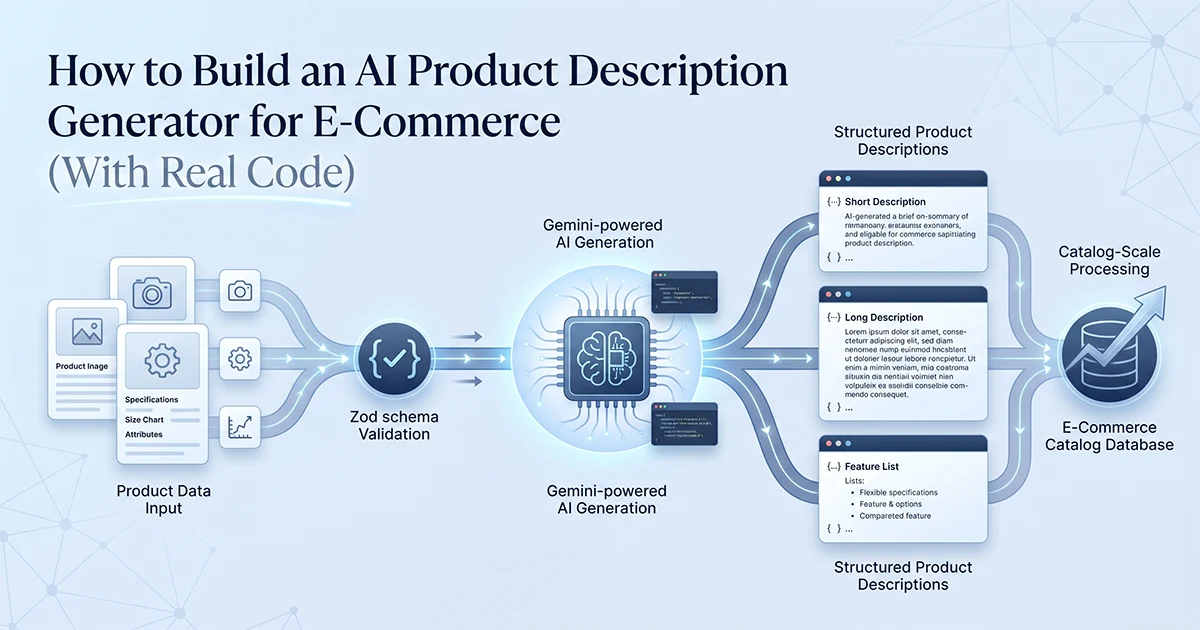
Asking AI for one product description gives you one shot — structured output asks for five formats simultaneously: short, long, bullets, meta description, and keywords, all from a single API call.
See also: social media content automation pipeline and multi-tool registry architecture.
Every e-commerce merchant faces the same multi-channel problem. Amazon and Shopify product listings need five bullet points starting with action verbs. Google Shopping and product cards need a 50–75 word short description. The product page itself needs 150–200 words of benefit-focused copy. The SEO plugin needs a meta description capped at 160 characters. Store search and ad targeting need keyword lists. Writing each format manually for one product takes 20–30 minutes. Calling the AI API five separate times per product multiplies cost and latency by five.
The structured output approach solves both problems. A Zod output schema defines all five formats. The Vercel AI SDK's generateObject() with Gemini 2.5 Flash fills every field in one call. The merchant picks what they need per channel — no re-prompting, no copy-pasting between formats.
I use this exact pattern across the content generation tools in a multi-tool AI platform I built — Facebook page descriptions, ad copy, YouTube scripts, Instagram captions. Swap the input schema and output fields for e-commerce, and the architecture is identical: Zod schema → service → Server Action → React wizard UI. The React UI is a simple wizard: product details form on step one, five formatted outputs on step two with copy buttons per field. Merchants rarely need all five formats for every product — but having them ready eliminates the back-and-forth of re-prompting for each channel.
Compare that to a ChatGPT workflow: paste product specs, ask for a description, copy the result, re-prompt for bullets, re-prompt for meta description, re-prompt for keywords. Four separate conversations, four chances for inconsistent tone, four manual copy steps. Structured output collapses that into one validated object your application can route to the right export format automatically.
| Provider | Quality for e-commerce | Cost per 1000 products | Structured output | Rate limits |
|---|---|---|---|---|
| Gemini 2.5 Flash | ✅ Excellent for standard products | ~$0.10–0.40 | ✅ Via Vercel AI SDK generateObject | 1000 RPM paid tier |
| GPT-4o-mini | ✅ Good | ~$0.20–0.80 | ✅ Via json_object mode | 5000 RPM |
| Claude Haiku 3.5 | ✅ Good | ~$0.15–0.60 | ✅ Via tool_use | 2000 RPM |
| GPT-4o | ✅ Best quality (technical products) | ~$1.50–6.00 | ✅ | 5000 RPM |
| Claude Sonnet 4.6 | ✅ Excellent for nuanced copy | ~$0.80–3.00 | ✅ Via tool_use | 1000 RPM |
| Best for catalog (cost) | — | Gemini 2.5 Flash ✅ | — | — |
The difference between a product description generator that works and one that converts is in the output structure. Ask for one description and you get one shot. Ask for five formats simultaneously — and the merchant picks what works for each channel. Structured output is what makes AI useful at scale, not just impressive in a demo.
The Input and Output Schemas: The Foundation of Reliable Generation
Define both input and output as Zod schemas before writing any AI logic — the input schema validates merchant data, and the output schema enforces the five description formats every time.
This is step one in every content tool I ship. The input schema is what the merchant form submits. The output schema is what Gemini must return. TypeScript types are inferred with z.infer<typeof Schema> — no duplicate interface declarations. When you change a field constraint, both validation and types update together.
The input schema also acts as documentation for what the merchant must provide. Requiring at least two features and at least one SEO keyword prevents the empty-input problem — Gemini cannot write compelling copy from "product name: widget" with no features listed. The pricePoint optional field calibrates tone: luxury copy for premium products uses different vocabulary than budget-friendly casual copy, even when the tone enum is the same.
import { z } from 'zod'

// Input schema — validates what comes in from the merchant form
export const ProductDescriptionInputSchema = z.object({
  name: z.string().min(2).max(200).describe('Product name'),
  category: z.enum(['electronics', 'clothing', 'beauty', 'home', 'food', 'other']),
  features: z.array(z.string().min(3).max(100)).min(2).max(10).describe('Key features'),
  targetAudience: z.string().min(5).max(200).describe('Who is this product for?'),
  tone: z.enum(['professional', 'playful', 'luxury', 'casual', 'technical']),
  seoKeywords: z.array(z.string()).min(1).max(5).describe('Keywords to include naturally'),
  pricePoint: z.enum(['budget', 'mid', 'premium', 'luxury']).optional(),
})

export type ProductDescriptionInput = z.infer<typeof ProductDescriptionInputSchema>

// Output schema — enforces 5 formats from Gemini
export const ProductDescriptionOutputSchema = z.object({
  shortDescription: z.string()
    .describe('50-75 word description for product cards and search results'),
  longDescription: z.string()
    .describe('150-200 word compelling product page description focusing on benefits'),
  bulletPoints: z.array(z.string().max(200)).length(5)
    .describe('5 feature bullets starting with action verbs — Amazon-ready format'),
  seoMetaDescription: z.string().max(160)
    .describe('SEO meta description under 160 characters for HTML meta tag'),
  searchKeywords: z.array(z.string()).min(5).max(8)
    .describe('5-8 search keywords this product should rank for'),
})

export type ProductDescriptionOutput = z.infer<typeof ProductDescriptionOutputSchema>
Why z.describe() matters on output schema
When this schema is passed to generateObject(), the .describe() strings are read by Gemini as instructions for each field. Without descriptions, Gemini fills fields based on field names alone — less precise output. With descriptions, length constraints, format requirements, and channel context guide the model. "50–75 word description for product cards" and "150–200 word compelling product page description" produce very different copy than undescribed shortDescription and longDescription fields.
Length constraints in the schema
z.string().max(160) on seoMetaDescription enforces Google's meta description limit at the schema level. z.array(z.string().max(200)).length(5) on bulletPoints matches Amazon's approximate 200-character bullet limit and requires exactly five bullets every time. Gemini respects max constraints declared in Zod when used with generateObject() — the output is truncated automatically if exceeded, with no post-processing needed for length.
Add .describe() to every field in your output schema. These descriptions are the system prompt at the field level. "50-75 word description" and "150-200 word compelling description" produce very different results than an undescribed shortDescription and longDescription.
The Gemini Service: generateObject for Structured E-Commerce Copy
The Vercel AI SDK's generateObject with Gemini 2.5 Flash generates all five description formats in a single API call — avoiding the 5× cost and latency of calling the API separately for each format.
The service layer is pure AI logic — no auth, no rate limiting, no database calls. I keep it isolated so I can test prompt changes without spinning up the full Next.js app. The Server Action handles security; the service handles copy quality.
import { generateObject } from 'ai'
import { google } from '@ai-sdk/google'
import type { ProductDescriptionInput, ProductDescriptionOutput } from '../types'
import { ProductDescriptionOutputSchema } from '../schemas/product-description.schema'

// System prompt sets copywriting standards — tone, benefit focus, keyword rules
const SYSTEM_PROMPT = `You are an expert e-commerce copywriter with 10+ years
writing product descriptions that convert browsers into buyers.
You write copy that:
- Focuses on customer benefits rather than raw features
- Uses sensory or emotional language matched to the product category
- Includes required keywords naturally (never keyword-stuffed)
- Matches the specified tone precisely — luxury copy sounds different from casual
- Speaks directly and specifically to the stated target audience`

function buildPrompt(input: ProductDescriptionInput): string {
  const priceContext = input.pricePoint
    ? `Price positioning: ${input.pricePoint} — calibrate language accordingly.`
    : ''

  return `Generate all product description formats for:

Product Name: ${input.name}
Category: ${input.category}
${priceContext}
Key Features:
${input.features.map(f => `• ${f}`).join('\n')}
Target Audience: ${input.targetAudience}
Tone: ${input.tone}
Required keywords (include naturally in descriptions): ${input.seoKeywords.join(', ')}

Bullet points must start with action verbs and highlight what the customer gains,
not just what the product does.`
}

export async function generateProductDescriptions(
  input: ProductDescriptionInput
): Promise<ProductDescriptionOutput> {
  const { object } = await generateObject({
    model: google('gemini-2.5-flash'),
    schema: ProductDescriptionOutputSchema,
    system: SYSTEM_PROMPT,
    prompt: buildPrompt(input),
  })
  return object
}
Why Gemini 2.5 Flash over GPT-4o for catalog generation
Cost at scale is the deciding factor. A merchant generating 500 new product descriptions per month on GPT-4o spends 5–10× more than on Gemini Flash — and for standard consumer products (kitchenware, clothing, accessories), the copy quality difference is negligible. Gemini Flash at 1000 RPM on the paid tier handles catalog throughput comfortably with the batch pattern below. Reserve GPT-4o for complex technical products — electronics with detailed specs, medical devices, B2B industrial equipment — where nuance and precision matter more than volume.
The buildPrompt() helper keeps product-specific context out of the system prompt. System prompt sets copywriting standards that apply to every product. The user prompt injects the specific product data. Separating them makes A/B testing prompt changes easier — tweak the system prompt once, every product benefits. Tweak the user prompt template when you add new input fields like warranty info or material composition.
// Example AI output — Bamboo Cutting Board
// Input: eco-conscious home cooks | casual tone | keywords: bamboo, eco-friendly, anti-bacterial

Short description (62 words):
Your kitchen deserves better than plastic. This bamboo cutting board is naturally
anti-bacterial, sustainably sourced, and tough enough for daily prep — including
a deep juice groove that catches drips before they reach your counter.
Comfortable side handles make moving it from fridge to prep station effortless.
Dishwasher-safe for the days you just don't want to handwash everything.

Bullet points:
• Naturally anti-bacterial bamboo surface — no synthetic coatings, just safe food prep
• Deep juice groove catches drips and keeps your counter clean during meal prep
• Ergonomic side handles for easy transfer from fridge to prep station to table
• Sustainably sourced eco-friendly bamboo — a choice your kitchen and the planet will thank you for
• Dishwasher-safe construction makes cleanup as easy as the cooking

SEO meta (158 chars):
Eco-friendly bamboo cutting board with anti-bacterial surface, juice groove, and ergonomic handles. Sustainably sourced and dishwasher-safe. Perfect for daily prep.
The Server Action: Auth, Rate Limiting, and the 4-Gate Pattern
Wrap the Gemini service in a Next.js Server Action with four security gates — authentication, rate limiting, locking, and input validation — to prevent the AI service from being called without authorization or abused.
Every content tool in the affiliate marketing SaaS I built follows this 4-gate pattern. Gate 1 confirms the user is signed in. Gate 2 enforces per-user rate limits so one merchant cannot exhaust the shared Gemini API budget. Gates 3 and 4 validate input with Zod before any AI call happens — malformed data never reaches Gemini.
The ActionResponse<T> generic return type keeps the client-side error handling consistent across every tool in the platform. Success returns { success: true, data: result }. Failure returns { success: false, error: string } with optional field errors or retry timing. The React form checks response.success before rendering output — no try/catch scattered across UI components.
'use server'
import { auth } from '@/lib/auth'
import { checkRateLimit } from '@/lib/rate-limit'
import { ProductDescriptionInputSchema } from '../schemas/product-description.schema'
import { generateProductDescriptions } from '../services/product-description.service'
import type { ActionResponse } from '@/types'

export async function generateProductDescriptionAction(
  input: unknown   // Always unknown — never trust client-submitted types
): Promise<ActionResponse<ProductDescriptionOutput>> {
  // Gate 1: Authentication — never trust client-side user identity
  const session = await auth()
  if (!session?.user?.id) {
    return { success: false, error: 'Unauthorized — please sign in' }
  }
  const userId = session.user.id

  // Gate 2: Rate limiting — Gemini has per-minute limits; protect against abuse
  // Each user gets max 20 generations per minute
  const rateLimit = await checkRateLimit(userId, { limit: 20, window: 60 })
  if (!rateLimit.allowed) {
    return {
      success: false,
      error: 'Rate limit reached — please wait before generating more descriptions',
      retryAfter: rateLimit.resetAt,
    }
  }

  // Gate 3 & 4: Validate input schema before hitting Gemini
  const parsed = ProductDescriptionInputSchema.safeParse(input)
  if (!parsed.success) {
    return {
      success: false,
      error: 'Invalid input',
      fieldErrors: parsed.error.flatten().fieldErrors,
    }
  }

  // Execute: call Gemini service with validated input
  const result = await generateProductDescriptions(parsed.data)
  return { success: true, data: result }
}
Why rate limiting is critical for e-commerce tools
An e-commerce merchant may try to generate descriptions for their entire 10,000-product catalog at once. Without rate limiting, one merchant exhausts the Gemini API budget for the entire application. Twenty generations per minute per user is a sensible default — that is 1,200 products per hour in single-product mode, enough for any manual workflow while protecting shared infrastructure.
The input: unknown type on Server Actions
Server Actions can receive any data from the client — always type the parameter as unknown and parse with Zod before using. Trusting the TypeScript type of client-submitted data would allow malformed or malicious payloads to reach the AI service. The safeParse() call in Gate 3 returns field-level errors the React form can display per input.
Batch Generation for Product Catalogs
For generating descriptions for dozens to hundreds of products, use a batched Promise.allSettled pattern with rate-limit-aware delays between batches — processing 5 products concurrently with 1.2-second gaps.
The batch processor
Single-product generation works for manual workflows. Catalog import needs batching. Gemini 2.5 Flash allows 1000 requests per minute on the paid tier. Processing 5 products concurrently with a 1200ms gap between batches keeps well within that limit — roughly 300 products per minute at peak throughput without hitting rate errors.
Use Promise.allSettled(), not Promise.all(). One failed product — bad input, transient API error — should not crash the entire batch. allSettled records the failure per product and continues. The merchant gets a results CSV with status columns: success or error per row.
const BATCH_SIZE = 5
const BATCH_DELAY_MS = 1200   // 1.2s between batches — stays under 1000 RPM

export async function batchGenerateDescriptions(
  products: ProductDescriptionInput[],
  onProgress: (completed: number, total: number) => void = () => {}
): Promise<BatchDescriptionResult[]> {
  const results: BatchDescriptionResult[] = []

  for (let i = 0; i < products.length; i += BATCH_SIZE) {
    const batch = products.slice(i, i + BATCH_SIZE)
    const batchResults = await Promise.allSettled(
      batch.map(product => generateProductDescriptions(product))
    )

    batchResults.forEach((result, idx) => {
      results.push({
        product: batch[idx],
        status: result.status,
        descriptions: result.status === 'fulfilled' ? result.value : null,
        error: result.status === 'rejected' ? String(result.reason) : null,
      })
    })

    onProgress(Math.min(i + BATCH_SIZE, products.length), products.length)

    if (i + BATCH_SIZE < products.length) {
      await new Promise(resolve => setTimeout(resolve, BATCH_DELAY_MS))
    }
  }
  return results
}
CSV import → batch process → CSV export
The most practical interface for Shopify and WooCommerce merchants: upload a CSV with product name, features, category, and target audience columns. The batch processor runs with a progress bar. Download a CSV with all five description formats added as new columns — short, long, bullets (pipe-separated), meta description, keywords. Import the result back into the store or PIM. This workflow is what e-commerce clients actually use; a single-product wizard is the demo, CSV batch is the production feature.
When batch processing won't work in a Server Action
Next.js Server Actions have a 60-second hard timeout. Processing 50 products at 5 per batch with 1.2-second delays takes roughly 12 seconds — fine. Processing 500 products takes over two minutes — the Server Action times out and the merchant gets nothing. For catalogs over 100 products, use a background job queue: BullMQ for Node.js, or Celery for Python backends. Store results in the database, expose a polling endpoint or SSE stream for progress — the same pattern I use in an AI report generation SaaS I built for another domain.
Never process more than ~50 products synchronously in a Server Action. The 60-second timeout is a hard limit. For catalogs of 100+, you need a job queue and a progress endpoint. Trying to do 1000 products synchronously results in a timeout error and no output at all.
SEO-Aware Output: Descriptions That Rank and Convert
SEO awareness is built into the output structure — required keywords are listed in the prompt, the schema enforces a 160-character meta description, and the searchKeywords field provides the metadata merchants need for their SEO plugin or ad targeting.
How keyword injection works
The prompt explicitly lists seoKeywords: "Required keywords (include naturally): ergonomic, bamboo, eco-friendly." Gemini weaves these into the copy without mechanical keyword stuffing. The structured output schema returns keywords as a separate searchKeywords field — useful for populating Shopify product tags, Google Ads keyword lists, or the SEO plugin's focus keyword field. Merchants get both natural in-copy inclusion and a ready-made keyword list from one generation.
Post-processing validations worth adding
Schema constraints catch most issues at generation time, but three post-processing checks add production reliability. Character count validation: flag Amazon bullet points exceeding 200 characters — truncate or regenerate that bullet specifically, not the whole output. Keyword density check: verify each seoKeyword appears at least once in the long description; if missing, regenerate only the longDescription field. Readability score: run a Flesch-Kincaid check on the long description — aim for Grade 8 readability for broad consumer products; flag technical copy that scores above Grade 12 for manual review.
The five-format output also maps cleanly to common e-commerce platform fields. Shopify: long description → body HTML, meta description → SEO title plugin, searchKeywords → product tags. Amazon: bulletPoints → listing bullets, shortDescription → backend keywords. Google Merchant Center: shortDescription → product snippet, seoMetaDescription → landing page meta. Building the schema around these channel requirements upfront means merchants export directly instead of reformatting AI output manually.
Hassan Raza documents production AI patterns — structured output, batch processing, multi-tool SaaS architecture — across posts on hassanr.com. The schema → service → action → UI pattern in this post is the same foundation behind every content tool I ship, whether the output is affiliate ad copy or e-commerce product descriptions.
Frequently Asked Questions
Define Zod input and output schemas with five output formats: short description, long description, bullet points, SEO meta description, and search keywords. Create a service using generateObject from the Vercel AI SDK with Gemini 2.5 Flash, wrap it in a Next.js Server Action with authentication and rate limiting, and connect it to a React form UI. Structured output generating five formats in one API call is more useful than a single description — merchants need different formats for Amazon, Google Shopping, product pages, and SEO plugins. The complete implementation spans about six TypeScript files following the schema → service → action → UI pattern I use across every content tool I build.
For standard product descriptions at catalog scale, Gemini 2.5 Flash via the Vercel AI SDK offers the best balance of quality and cost — approximately $0.10–0.40 per 1000 products. GPT-4o-mini is a close second at slightly higher cost but more generous rate limits at 5000 RPM versus Gemini's 1000 RPM. For technical or luxury products where nuanced copy matters, GPT-4o or Claude Sonnet 4.6 produce noticeably higher quality at 5–10× the cost. Choose based on scale: Gemini Flash for catalogs, GPT-4o for high-value individual products.
Process products in batches of five with Promise.allSettled() and 1.2-second delays between batches to stay within Gemini's 1000 RPM rate limit. For catalogs under 50 products, synchronous batch processing works fine in a Next.js Server Action. For 100 or more products, use a background job queue like BullMQ with polling or SSE for progress tracking — Server Actions have a 60-second timeout that synchronous bulk processing will exceed. Provide a CSV import and export interface: merchants upload product data, the processor runs batches, and they download a CSV with all five description formats added as columns.