
Why a Pipeline Beats Individual AI Tools for Content Creation
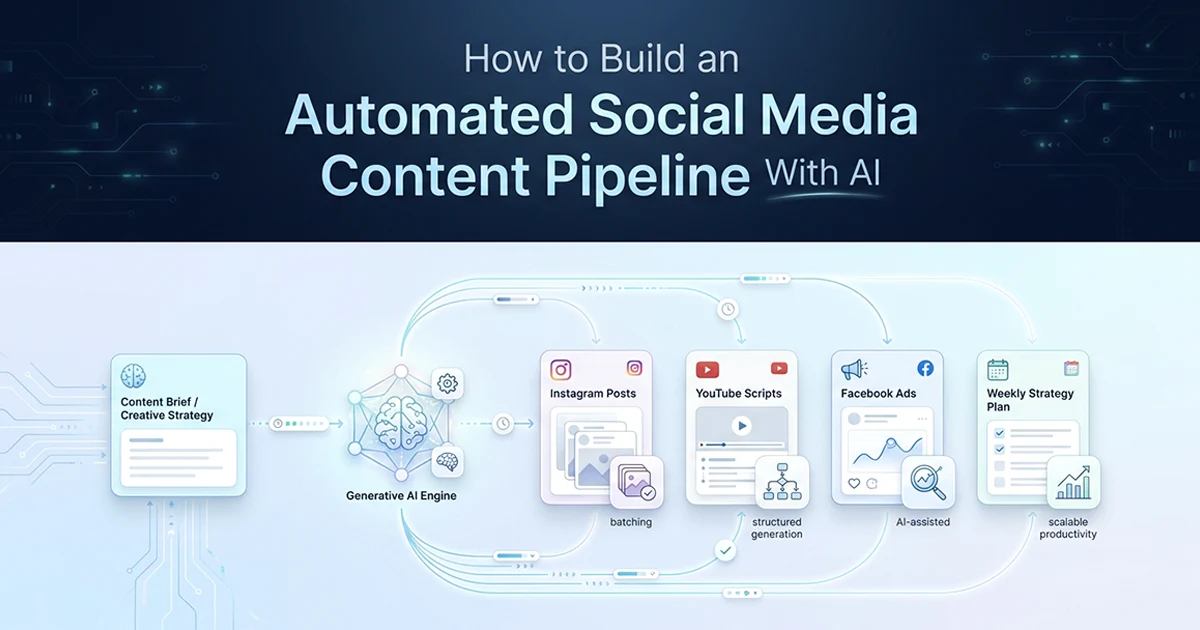
Individual AI tools produce disconnected content — a pipeline generates strategy first, then derives all platform content from that strategy, producing a coherent multi-platform content story from one input.
See also: AI content generation with Zod schemas and tool registry for multi-tool platforms.
Most creators using AI today open ChatGPT three separate times: once for Instagram captions, once for a YouTube script, once for Facebook ad copy. Each session starts cold. The Instagram post has no relationship to the YouTube video. The Facebook ad contradicts the week's theme. You saved time on each individual piece — maybe 30% of the total work — but you still spent 3–4 hours coordinating, editing, and making the pieces feel connected.
A pipeline inverts that sequence. Step 1 generates a weekly strategy — theme, three content pillars, platform-specific tone notes — in about 5 seconds. Step 2 generates Instagram, YouTube, and Facebook content in parallel, all informed by that strategy. Total API time: about 30 seconds. Human review and adjustment: about 20 minutes. The creator's job shifts from production to creative direction.
I built this pattern across six content tools in a multi-tool AI platform I built — Instagram page starter, faceless Instagram growth, YouTube channel starter, YouTube idea generator, YouTube script generator, and Facebook ad copy generator. Each tool follows schema → service → action → UI. The weekly pipeline combines them into one coordinated system.
The Facebook ad generator produces three variations per batch — problem-aware, solution-aware, and transformation — with headline capped at 40 characters and primary text at 125 characters before the "See More" cutoff. Running it through the same weekly strategy means your ad copy references the same theme as your Instagram posts and YouTube video that week. That coherence is what generic ChatGPT sessions cannot replicate.
| Platform | Content type | Key constraints | Schema enforces | Generation time |
|---|---|---|---|---|
| 7 captions + hashtags | firstLine ≤140 chars, 20–30 hashtags | Vary types across 7 days | ~20s | |
| YouTube | 2 ideas + 1 full script | Hook section separate + required | Spoken content (not outline) | ~25s |
| 3 ad variations | Headline ≤40 chars, primary ≤125 chars | 3 types: problem/solution/transformation | ~15s | |
| TikTok | 5 video concepts | Hook ≤5 seconds (written) | Visual direction per concept | ~15s |
| All (strategy) | Weekly theme + pillars | 3 pillars required | Coherent multi-platform story | ~5s |
The content creator's bottleneck isn't ideas — it's execution. A creator who knows their weekly theme still spends 3–4 hours writing captions, scripting videos, and planning hashtags. A well-designed AI pipeline compresses that execution to 20 minutes of review and adjustment. The creator's value shifts from production to creative direction.
Strategy first, always. If you generate Instagram captions without first defining the weekly theme, you get 7 unrelated posts. A 5-second strategy generation step — one extra API call before the batch — produces coherent content across all platforms. This is the difference between a content calendar and a random content dump.
The Content Brief: One Input That Drives All Platforms
The content brief is a typed Zod schema with the creator's niche, target audience, platforms, and tone — it is the single input the entire pipeline derives all platform content from.
What goes in the brief
niche: the creator's topic area — "fitness for busy professionals" not just "fitness." week: an integer week number that prevents content repetition across pipeline runs. targetAudience: who will see and engage — "professionals 25–40, limited time, want results." platforms: array of platforms to generate for — Instagram, YouTube, Facebook, TikTok. tone: educational, motivational, entertainment, or mixed. contentPillars: optional override if the creator wants to specify their own pillars instead of letting the AI choose.
import { z } from 'zod'

// The single input that drives all platform content
export const ContentBriefSchema = z.object({
  niche: z.string().describe('Creator niche — e.g., "fitness for busy professionals"'),
  week: z.number().int().min(1).describe('Week number — prevents content repetition'),
  targetAudience: z.string().describe('Specific audience — who will see and engage'),
  platforms: z.array(z.enum(['instagram', 'youtube', 'facebook', 'tiktok'])).min(1),
  tone: z.enum(['educational', 'motivational', 'entertainment', 'mixed']),
  contentPillars: z.array(z.string()).max(5).optional()
    .describe('Override AI pillars — e.g., ["mindset", "nutrition", "workouts"]'),
})

export type ContentBrief = z.infer<typeof ContentBriefSchema>

// Step 1 output — informs all subsequent platform generation
export const WeeklyStrategySchema = z.object({
  weeklyTheme: z.string()
    .describe('Unifying theme that connects all content this week'),
  contentPillars: z.array(z.object({
    pillar: z.string(),
    ratio: z.number().min(0).max(100).describe('% of weekly content for this pillar'),
    description: z.string().describe('What content under this pillar looks like'),
  })).length(3),
  platformNotes: z.record(z.string())
    .describe('Platform-specific tone — e.g., {instagram: "casual", youtube: "authoritative"}'),
  weeklyHook: z.string().describe('One central message to repeat across all platforms'),
})

export type WeeklyStrategy = z.infer<typeof WeeklyStrategySchema>
Why the week field matters
Passing the week number to the AI ensures content variety — week 1 content differs from week 3 content even for the same niche. Without it, the model produces similar themes every run. Week 1 for a new fitness creator might focus on mindset and getting started. Week 12 might focus on advanced techniques and community stories. The week field is how you prevent the pipeline from feeling repetitive after the first month.
The optional contentPillars field lets established creators override the AI's pillar choices. A fitness creator who always posts about mindset, nutrition, and workouts can pass those three pillars directly — the strategy step then allocates ratios across them instead of inventing new ones. New creators leave it empty and let the AI propose pillars based on niche and audience.
Step 2: Instagram — Generating 7 Posts With Structured Constraints
Instagram batch generation uses a typed Zod schema that enforces platform-specific constraints — firstLine max 140 chars, caption max 1100 chars, 20–30 hashtags per post — so every output is platform-ready without post-processing.
The Instagram schema constraints
firstLine (max 140 chars): this is ALL the user sees on their feed before the "more" button. If the hook fails here, nobody reads the caption. caption (max 1100 chars): Instagram allows 2200 characters but engagement drops significantly after 1100. hashtags (20–30): the sweet spot in 2026 — fewer than 20 limits reach; more than 30 triggers spam signals. Mix niche, community, and broad hashtags. type: vary across 7 days — educational, motivational, transformation, cta, behind-scenes — never two educational posts in a row.
Building constraints into the Zod schema — not post-processing — means Gemini returns upload-ready content. You do not trim captions after generation or count hashtags manually. If the schema says max 140 characters on firstLine, generateObject enforces it at generation time. This is the same structured output pattern I use for e-commerce product descriptions and support ticket classification — platform rules become schema rules.
import { generateObject } from 'ai'
import { google } from '@ai-sdk/google'
import { z } from 'zod'

const InstagramPostSchema = z.object({
  day: z.number().min(1).max(7),
  type: z.enum(['educational', 'motivational', 'transformation', 'cta', 'behind-scenes']),
  firstLine: z.string().max(140)
    .describe('CRITICAL: ALL that shows before "more". Must hook immediately.'),
  caption: z.string().max(1100)
    .describe('Full caption — under 1100 chars for engagement. Conversational tone.'),
  hashtags: z.array(z.string()).min(20).max(30)
    .describe('Mix: 5-8 niche + 5-8 community + 5-8 broad hashtags'),
  visualDirection: z.string()
    .describe('Image/video direction — enough detail for Canva or AI image gen'),
})

const InstagramWeekSchema = z.object({
  posts: z.array(InstagramPostSchema).length(7),
})

export async function generateInstagramWeek(
  brief: ContentBrief,
  strategy: WeeklyStrategy,
): Promise<z.infer<typeof InstagramWeekSchema>> {
  const { object } = await generateObject({
    model: google('gemini-2.5-flash'),
    schema: InstagramWeekSchema,
    system: `You are an expert Instagram content strategist.
You understand the platform's algorithm in 2026:
- The first line determines whether someone clicks "more" — make it unmissable
- Hashtags should be a mix of niche (smaller, engaged) + community + broad
- Vary content types across the week — never two educational posts in a row`,
    prompt: `Generate 7 Instagram posts for Week ${brief.week}:
Niche: ${brief.niche}
Audience: ${brief.targetAudience}
Weekly Theme: ${strategy.weeklyTheme}
Tone: ${brief.tone}
Platform notes: ${strategy.platformNotes.instagram || 'conversational, authentic'}

Vary post types: start with educational or hook, end with CTA on Day 7.
Every first line must stop the scroll immediately.`,
  })
  return object
}
// Example AI output — Instagram Week, Fitness Niche, Week 1
Day 1 (Educational):
First line (140 chars): You're not too busy to get fit. You're using the wrong framework. Here's what actually works with 30 minutes →
Caption: Most fitness plans are designed for people with 2-hour gym blocks.
You don't have that. And honestly? You don't need it.
Three things that move the needle when time is your scarcest resource:
→ Compound movements over isolation (20 min, full body)
→ Prep your workout clothes the night before (removes the decision)
→ Track one metric — not five (consistency beats perfection)
Stop waiting for the perfect schedule. Start with 30 minutes today.
What's your biggest time constraint? Drop it below. ↓
Hashtags: #busyfitness #30minuteworkout #fitforlife #workoutmotivation
#fitnessforbeginners #homeworkout #fitnessmotivation #healthylifestyle
#fitnesstips #quickworkout #noexcuses #fitnessjourney #morningworkout
#strengthtraining #fitnessgoals #workoutathome #fitfam #fitlife
#healthandwellness #fitnesscoach #timeefficient #busylifestyle
Visual direction: Split-screen image — left: messy desk with work, right: compact home workout space. Text overlay: "You have 30 minutes."
Day 4 (Motivational):
First line (138 chars): The person you want to be is already working out. You're just running late. →
Caption: You don't need more motivation. You need fewer excuses dressed up as reasons.
Every busy professional who got fit didn't find extra hours.
They stopped treating fitness like something that happens when life calms down.
Life doesn't calm down. You build the habit anyway.
This week: one 30-minute session. Not perfect. Just done.
Tag someone who needs to hear this today.
Hashtags: #motivationmonday #fitnessmindset #noexcuses #disciplineovermotivation
[+ 16 more across niche/community/broad categories]
Visual direction: Single person mid-workout in a small apartment, natural light, no gym equipment visible. Caption overlay in bold white text.Step 3: YouTube — Ideas and Full Scripts in One Generation
YouTube content generation produces two video ideas for scheduling flexibility and one full script with an enforced hook section — because the first 30–45 seconds determine whether a viewer stays.
Why the hook section is a separate schema field
YouTube's algorithm scores watch time heavily. The hook — first 30–45 seconds — determines viewer retention. Including it as a separate, required schema field forces the AI to write it fully as spoken content, not as a note like "start with a hook here." A weak hook outline becomes a weak video opening. The schema field hook must contain the actual words the creator will say — "In the next 8 minutes, I'm going to show you the exact 30-minute workout framework I used to..." not "Introduce the topic."
The full script schema
The script structure: hook → 3–6 sections → conclusion + CTA. Each section contains spoken content — full sentences, not bullet points. A creator reading the script aloud should understand exactly what the video will sound like. The YouTube script generator in the affiliate marketing SaaS I built produces this format: title, hook (first 30 seconds as spoken text), 5–8 content sections, conclusion with subscribe and comment prompt. The weekly pipeline uses the same structure, informed by the weekly strategy theme.
Two video ideas per week give scheduling flexibility — the creator picks which to film first based on energy, equipment, or trending topics. The full script covers the primary video; ideas cover the backup or series continuation.
The YouTubeContentSchema enforces: two video ideas with title, hook, estimated length, and thumbnail text; one fullScript with hook written as spoken content, 3–6 sections each containing full paragraphs (not bullets), and a CTA with subscribe plus comment prompt. Faceless Instagram growth tools in the affiliate marketing SaaS I built use the same spoken-content principle — hooks written as words the creator will actually say, not outline notes.
The Pipeline Orchestrator: Strategy First, Platforms in Parallel
The orchestrator is the core of any AI social media content automation pipeline creator 2026 build — it calls strategy generation first synchronously, then dispatches all platform generation in parallel using Promise.all, cutting total generation time from about 60 seconds sequential to about 30 seconds.
'use server'
import { auth } from '@/lib/auth'
import { checkRateLimit } from '@/lib/rate-limit'
import { ContentBriefSchema } from '../schemas/content-pipeline.schema'
import { generateWeeklyStrategy } from '../services/strategy.service'
import { generateInstagramWeek } from '../services/instagram.service'
import { generateYouTubeContent } from '../services/youtube.service'
import { generateFacebookAds } from '../services/facebook.service'
import type { ActionResponse } from '@/types'

export async function generateWeeklyContentAction(
  input: unknown,
): Promise<ActionResponse<WeeklyContent>> {
  const session = await auth()
  if (!session?.user?.id) return { success: false, error: 'Unauthorized' }

  const rateLimit = await checkRateLimit(session.user.id)
  if (!rateLimit.allowed) return { success: false, error: 'Rate limit exceeded' }

  const parsed = ContentBriefSchema.safeParse(input)
  if (!parsed.success) return { success: false, error: 'Invalid input' }
  const brief = parsed.data

  // Step 1: Strategy MUST complete before platforms — informs all content
  const strategy = await generateWeeklyStrategy(brief)

  // Step 2: Platform generation in parallel — after strategy is ready
  const [instagram, youtube, facebook] = await Promise.all([
    brief.platforms.includes('instagram')
      ? generateInstagramWeek(brief, strategy)
      : Promise.resolve(null),
    brief.platforms.includes('youtube')
      ? generateYouTubeContent(brief, strategy)
      : Promise.resolve(null),
    brief.platforms.includes('facebook')
      ? generateFacebookAds(brief, strategy)
      : Promise.resolve(null),
  ])

  return {
    success: true,
    data: { strategy, instagram, youtube, facebook, generatedAt: new Date() },
  }
}
Why strategy must be synchronous (not parallel with platforms)
If strategy and Instagram generate simultaneously, Instagram content is produced without the weekly theme context. The strategy step takes 5 seconds. Running platforms before it produces disconnected content — seven Instagram posts that do not reference the week's central message. Sequence: strategy first. Then parallel. Sequential total: 5 + 20 + 25 = 50 seconds. Parallel after strategy: 5 + max(20, 25) = 30 seconds.
The Server Action wraps the orchestrator with auth and rate limiting — same 4-gate pattern I use across every AI tool in production. Creators get one pipeline run per minute by default, which is enough for weekly content planning without exhausting the shared Gemini budget. The UI is a simple wizard: content brief form on step one, strategy preview on step two, platform tabs with copy buttons on step three, CSV export on step four.
Add the week number to every generateObject call — not just the ContentBrief. Week 1 content for a new fitness creator should differ from Week 12 content for an established creator. Including week context in Instagram, YouTube, and Facebook prompts prevents repetition as the creator uses the pipeline across months.
Export and Scheduling: Getting Content Into Your Publishing Workflow
The pipeline output should export to CSV for Buffer, Later, and Hootsuite, and provide copy-paste blocks per platform — a creator should not manually reformat AI output to get it into their scheduler.
The CSV export format for scheduling tools
Export structure for scheduling tool import:
date,platform,caption,hashtags,visual_direction
2026-06-23,instagram,"You're not too busy to get fit...","#busyfitness #30minuteworkout...","Split-screen desk vs workout space"
2026-06-24,instagram,"The person you want to be...","#motivationmonday...","Person mid-workout in apartment"
Buffer and Later accept this format directly — the creator uploads once and all 7 posts appear in their scheduler queue with dates pre-assigned. Add a copy button per post in the UI for creators who paste manually into native platform schedulers.
Notion import works similarly: map CSV columns to a calendar database with date, platform, caption, and visual direction fields. Creators who plan in Notion get a week-at-a-glance view without switching tools. The export layer is where developer effort pays off for creator UX — the generation is the backend; the export is what creators touch daily. When I built this for a multi-tool AI platform I built, creators thanked me most for CSV they could import — not JSON they had to reformat.
The content cost comparison
API cost per weekly pipeline: less than $0.01 on Gemini 2.5 Flash (~5,000–8,000 tokens total at $0.075/$0.30 per million tokens). Monthly for 4 weeks: $0.01–0.02. Compare to a content writer subscription at $100–500 per month, or a freelance social media manager at $500–2,000 per month. The API cost is negligible — the value is in structured, strategy-coherent output that would take a human 3–4 hours to produce.
What AI doesn't replace in the pipeline
Review and personalisation: the creator reads every caption and adjusts voice, adds personal stories, removes anything that sounds generic. Visual creation: visualDirection tells the creator what to make — Canva templates, photos, and video still require human execution. Engagement: responding to comments, DMs, and community building stays fully human. The pipeline handles the production bottleneck. The creator handles the human layer that makes content convert.
For developers building this as a SaaS product: the pipeline is the differentiator, not any single platform generator. Individual Instagram or YouTube tools are commodities — dozens exist. A strategy-first weekly pipeline that produces coherent multi-platform content from one brief is what creators pay for. Price it against the $100–500/month they currently spend on content tools and freelance writers, not against the $0.01 API cost.
Hassan Raza documents production AI patterns — structured output, multi-tool SaaS architecture, batch content generation — across posts on hassanr.com. The schema → service → action → UI pattern in this pipeline is the same foundation behind every content tool I ship.
Frequently Asked Questions
Build a content pipeline: define a ContentBrief schema (niche, audience, platforms, tone, week number), generate a weekly strategy first (theme plus content pillars), then derive platform-specific content from that strategy in parallel. Use Zod schemas with platform constraints built in — Instagram firstLine ≤140 chars, Facebook headline ≤40 chars, YouTube hook as a separate required section. Gemini 2.5 Flash via the Vercel AI SDK generateObject produces all content in structured format with no parsing required. One brief input produces 7 Instagram posts, YouTube scripts, and Facebook ads in about 30 seconds of API time.
A strategy-first pipeline using a single content brief that informs all platform content for coherence. Architecture: ContentBrief schema, generate weekly strategy in about 5 seconds, then generate Instagram, YouTube, and Facebook in parallel in 20–25 seconds each. Platform-specific Zod output schemas enforce character limits and format requirements at the schema level — the AI returns upload-ready content, not drafts requiring reformatting. Gemini 2.5 Flash is cost-effective for high-volume generation at less than $0.01 per weekly pipeline. Export to CSV for direct import into Buffer, Later, or Hootsuite.
The content calendar generator has three components: a ContentBrief input form (niche, audience, platforms, week, tone), a pipeline that generates strategy then platform content, and an export layer that formats output as CSV (date, platform, caption, hashtags, visual_direction) for scheduling tools. Always generate the weekly strategy — theme plus content pillars — before generating individual platform content. This prevents the 7 Instagram posts from being thematically disconnected. Add the week number to every prompt to prevent content repetition across weeks.