
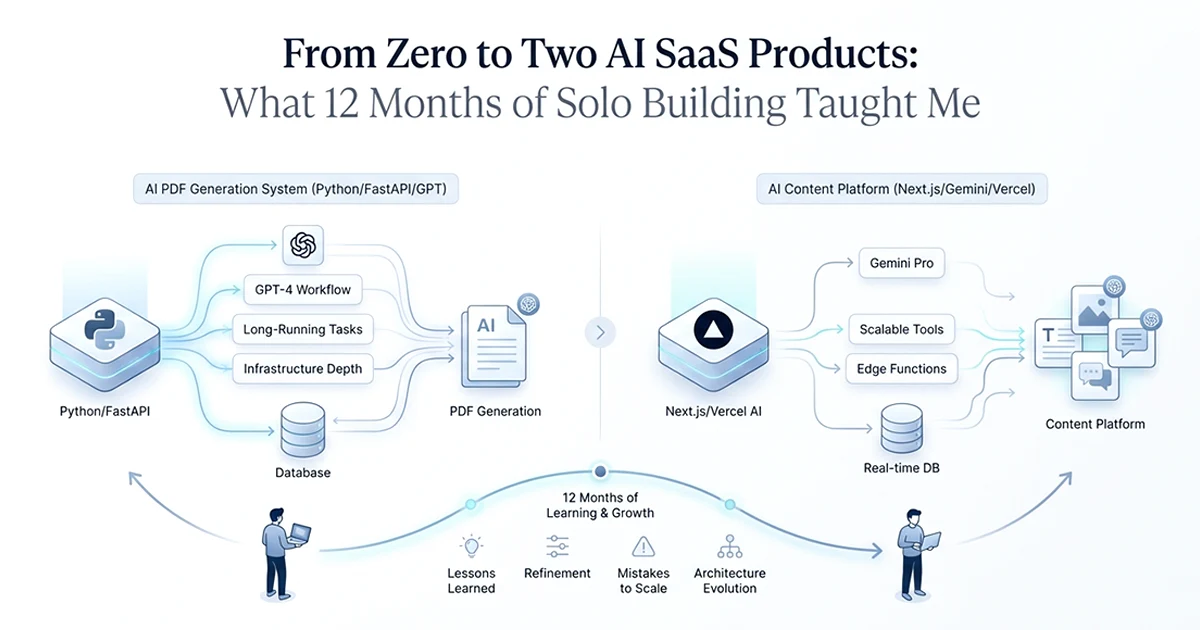
Two Products, Two Stacks, Zero Overlap — and Why That Was Correct
Building an AI PDF report generator and a multi-tool content platform on completely different stacks was not an accident — each problem demanded its own ecosystem, and recognizing this early saved both projects from architectural dead ends.
See also: GPT-4o cost reduction from $203 to $14 and tool registry pattern from the TypeScript platform.
The first product is an AI report generation SaaS I built. It generates multi-section PDF reports up to 1,725 pages using 161 sequential GPT-4o calls per large order, runs on Python and FastAPI with Celery and Redis for background jobs, stores data in MongoDB, and deploys across five Render services — one API and four workers. A single large report takes two to four hours to generate. I estimated three months to production. It took five to six.
The second is an affiliate marketing SaaS — a multi-tool AI platform with 10 Gemini-powered tools for Instagram, YouTube, and Facebook content. It runs on TypeScript and Next.js 16 with Prisma and PostgreSQL, deploys on Vercel, and handles one to three structured AI calls per user request. I estimated two months. It took three to four.
These stacks share almost nothing at the infrastructure level. That was the point. Swapping them would have broken both products before either reached production.
| Dimension | AI Report Generation SaaS | Multi-Tool Content Platform |
|---|---|---|
| Language | Python 3.11 | TypeScript 5 |
| Framework | FastAPI | Next.js 16 App Router |
| Database | MongoDB | PostgreSQL (Prisma 7) |
| AI model | GPT-4o | Gemini 2.5 Flash |
| Background jobs | Celery + Redis | N/A (synchronous Server Actions) |
| PDF generation | WeasyPrint + Jinja2 | N/A |
| Deployment | Render (5 services) | Vercel |
| Auth | JWT (custom) | NextAuth v5 |
| AI calls per request | 161 sequential (large) | 1–3 (structured output) |
| Timeline | ~5–6 months | ~3–4 months |
Lesson 1: Stack Selection Is Architecture, Not Preference
The right stack for an AI product is the one where the surrounding ecosystem — PDF libraries, background job systems, UI components — already exists and is mature; building against the grain of the ecosystem doubles your timeline.
Why Python was correct for the report SaaS
I did not choose Python because it is my comfort language. I chose it because the report product needed three things simultaneously: a battle-tested background job system for jobs lasting two to four hours, a PDF generation pipeline, and deep integration with the AI tooling ecosystem.
Celery is Python-native. There is no equivalent in the JavaScript ecosystem that matches its maturity for long-running distributed tasks. WeasyPrint and PyMuPDF — the libraries that turn HTML templates into multi-hundred-page PDFs — exist in Python. There is no JavaScript port of WeasyPrint. MongoDB's flexible document schema handled variable section structures across different report types without fighting a rigid relational model. Render's worker service type is designed exactly for this pattern: a web API that enqueues work, and separate worker processes that consume it.
Why TypeScript was correct for the content platform
The content platform's value is in UI richness — 10 tools, a command palette, dark mode, multi-tenant dashboards, and roughly 286 TypeScript files of interface code. Prisma's type generation makes multi-tenant queries type-safe. Server Actions collapse the auth, rate-limit, validate, execute pattern into a single file per tool. Vercel's preview deployments accelerated front-end iteration in a way Render never could for a dashboard product. shadcn/ui, cmdk, next-themes — the entire modern SaaS UI ecosystem is TypeScript-native. Python has no equivalent.
What would have broken if swapped
Next.js for the report SaaS: Vercel's serverless functions timeout at 60 seconds on the hobby tier, 300 on Pro. A four-hour report job is impossible. There is no Celery equivalent in Node that I would trust for 161 sequential API calls with recovery semantics. WeasyPrint does not exist in JavaScript.
Python for the content platform: Prisma does not exist in Python — SQLAlchemy is more verbose and lacks the generated types that make multi-tenant queries safe. React, shadcn/ui, and the command palette ecosystem are TypeScript-native. You would be rebuilding the entire front-end stack from scratch in a language the ecosystem abandoned for rich web UIs years ago.
The question is not "what stack do I know?" — it is "what stack is this problem's ecosystem built on?" For background jobs processing large documents: Python. For rich multi-tenant SaaS dashboards: TypeScript and Next.js. If the answer is the same for both problems, you are probably not thinking hard enough about one of them.
Lesson 2: Define Interfaces Before You Build Tool #1
Every hour spent defining the schema, config interface, or data model before writing code saves five hours of retrofitting — and I learned this the expensive way after losing a full week to a missing registry interface.
The retrofitting story
On the content platform, I built two AI tools before stepping back to design the architecture. Instagram captions worked. YouTube scripts worked. Then I started tool three and realized I needed a registry pattern — a single ToolConfig interface that the sidebar, command palette, routing layer, and every tool would share.
I retrofitted both existing tools, the sidebar navigation, and the command palette to a new interface with fields like id, name, slug, status, navTrafficType, and navChannel. One full week of refactoring. If I had spent two hours drawing that interface before tool one, I would have saved 38 or more hours. The cost of skipping upfront design was not zero — it was a week I could have spent on tool seven.
The same mistake in the report SaaS
I made the identical error on the report product. I built the large report type first — 161 sequential GPT-4o calls — without a generalized runner pattern. When I added the medium report type (52 calls) and the small report type (4 calls), I had to refactor the runner architecture to accept three different call patterns with different parameter shapes. That cost three to five days that a two-hour design session upfront would have avoided.
The question to ask before writing code
Before I write any multi-instance feature now, I ask one question: "What will the fifth version of this look like?" If the current design cannot accommodate five instances without significant structural changes, the design is wrong.
The practical approach I use: write the config or interface as a TypeScript type or Python dataclass with no implementation. Instantiate it for the first three cases you can think of. Find what they share and what varies. Then write the interface that fits all three. Only then write the first line of implementation.
Two hours of interface design before tool one costs nothing. One week of retrofitting after tool two costs everything you planned to ship that week. I paid this tax twice across two products. I will not pay it a third time.
Lesson 3: Estimate AI Costs Before Writing the First API Call
The $203 first run of the report product was not a surprise because GPT-4o is expensive — it was a surprise because I had not done the math before building the pipeline.
The $203 story
After the first production Horoscope report completed, I checked the OpenAI dashboard. $203. I had not estimated this number before writing a single API call.
The naive math I should have run first: 161 calls × 3,000 average input tokens = 483,000 input tokens. 161 calls × 800 average output tokens = 128,800 output tokens. At GPT-4o pricing ($2.50 per million input, $10.00 per million output): $1.21 in input costs plus $1.29 in output costs = roughly $2.50 per run. Reasonable for a premium product.
But context accumulated across sections. Each daily section pulled in context from prior days. Tokens per call grew as the pipeline progressed. The actual bill was $203 — roughly 80 times my back-of-envelope estimate. If I had built the estimation template below before writing the first call, I would have flagged the context accumulation risk immediately. I optimized it down to $14 per order — but only after the $203 invoice taught me the lesson.
The estimation template I use now
# Run this BEFORE writing the first API call
def estimate_pipeline_cost(
    calls: list[dict],  # [{"name": "...", "avg_input": N, "avg_output": N, "count": N}]
) -> dict:
    INPUT_PRICE_PER_M = 2.50   # GPT-4o
    OUTPUT_PRICE_PER_M = 10.00  # GPT-4o
    total = 0
    breakdown = []
    for call in calls:
        per_call = (
            (call["avg_input"] / 1_000_000) * INPUT_PRICE_PER_M +
            (call["avg_output"] / 1_000_000) * OUTPUT_PRICE_PER_M
        ) * call["count"]
        breakdown.append({**call, "cost": round(per_call, 4)})
        total += per_call
    return {"total": round(total, 4), "breakdown": breakdown}

# Estimate BEFORE building the report pipeline
report_calls = [
    {"name": "daily section", "avg_input": 3000, "avg_output": 800, "count": 30},
    {"name": "monthly section", "avg_input": 5000, "avg_output": 1500, "count": 12},
    {"name": "framework", "avg_input": 2000, "avg_output": 600, "count": 1},
]
estimate = estimate_pipeline_cost(report_calls)
print(f"Estimated cost: ${estimate['total']:.2f}")
# Output: Estimated cost: $2.19 (realistic if context were controlled)
# Actual first run: $203 — context accumulated beyond these estimates
The rule: estimate first, build second
This takes 30 minutes. It surfaces token accumulation risks, per-order economics, and pricing viability before you commit to an architecture. After the $203 lesson, I run this estimate before writing any multi-call AI pipeline — on both products. The content platform's Gemini costs stay at $20–60 per month because I modeled per-generation cost before building tool one.
Lesson 4: AI Products Have Failure Modes Traditional SaaS Doesn't
Traditional SaaS fails on user acquisition and pricing — AI SaaS fails on those and on cost at scale, quality at edge cases, and background job reliability in ways traditional products simply do not face.
Cost at scale
A content platform can be profitable at 10 users and lose money at 1,000 if AI generation cost per user exceeds subscription revenue at scale. Server costs in traditional SaaS scale smoothly — a $20/month user on a standard SaaS might cost $0.50 in infrastructure. The same user generating 200 AI items per month on GPT-4o instead of Gemini Flash could cost $60 in API fees alone. This failure mode does not exist in non-AI products. Always model AI cost at 100 users, 1,000 users, and 10,000 users before you set pricing.
Background job reliability
Four-hour report jobs will fail. The question is what happens when they do. My first version had no answer. The Celery worker died at step 87 of 161. The order status stayed at "generating." The customer waited forever. No alert fired. No recovery path existed. No admin panel to retry.
The production fix took longer to build than the happy path: task_acks_late=True, reject_on_worker_lost=True, explicit timeout handling with status updates on failure, a manual retry endpoint for admins, and a monitoring alert when jobs exceed five hours. The recovery infrastructure — not the AI calls themselves — was what made the product shippable.
Quality at edge cases
Ninety-five percent quality passes testing. The five percent that fails creates support tickets, refund requests, and reputation damage. A report section that contradicts an earlier section. A caption that ignores the user's niche. Monitoring quality over time — not just at launch — is part of the product, not a nice-to-have.
The hardest part of building an AI SaaS isn't the AI. It's the infrastructure around the AI: the cost management, the error recovery, the background job reliability, and the edge cases you didn't think of in the design phase. The last 20% of every AI feature — error handling, fallbacks, monitoring — takes as long as the first 80%.
What Transferred Between Projects, and What Had to Be Learned Twice
These building multiple AI SaaS products solo developer lessons 2026 only make sense once you see what carried over and what did not — the security pattern, cost discipline, and status tracking transferred directly; the background job infrastructure, database patterns, and frontend architecture had to be learned independently for each stack.
What transferred cleanly
The four-gate security pattern moved from FastAPI to Next.js Server Actions without conceptual changes: authenticate, rate limit, validate, then execute. Cost-first thinking from the $203 lesson applied immediately to the content platform. Status tracking keyed by session or order ID with lifecycle states — pending, processing, complete, failed — worked identically in MongoDB and PostgreSQL even though the query syntax differed.
# FastAPI (Report SaaS) — Python
@router.post("/generate")
async def generate_report(request: Request):
    # Gate 1: Auth
    user = await get_current_user(request)
    if not user:
        raise HTTPException(401, "Unauthorized")
    # Gate 2: Rate limit
    if not await check_rate_limit(user.id):
        raise HTTPException(429, "Rate limited")
    # Gate 3: Validate
    data = ReportSchema.model_validate(await request.json())
    # Gate 4: Execute
    return await report_service.create(user.id, data)
// Server Action (Content Platform) — TypeScript
'use server'
export async function generateContent(input: unknown) {
const session = await auth() // Gate 1: Auth
if (!session?.user?.id) return { error: 'Unauthorized' }
const rateLimit = await checkRateLimit(session.user.id) // Gate 2: Rate limit
if (!rateLimit.allowed) return { error: 'Rate limited' }
const parsed = InputSchema.safeParse(input) // Gate 3: Validate
if (!parsed.success) return { error: 'Invalid input' }
return await contentService.generate(session.user.id, parsed.data) // Gate 4: Execute
}The pattern is language-agnostic. The concept transferred completely. What changed was syntax and framework-specific middleware — not the architecture.
What did NOT transfer
Celery and Redis do not exist in JavaScript the way they exist in Python — BullMQ is different in semantics and deployment. MongoDB document queries and Prisma relational queries share no syntax. Render worker services and Vercel serverless functions are completely different deployment models. Python has no equivalent to React, shadcn/ui, or cmdk. Design patterns transfer. Ecosystem-specific implementations do not.
The honest timeline
Report SaaS: estimated three months, took five to six. Content platform: estimated two months, took three to four. Twelve months total for both, built sequentially as a solo developer. Both products hit the same pattern — the first 80% of core functionality went roughly as fast as estimated. The last 20% — error handling, edge cases, monitoring, admin tools, rate limiting, email delivery quirks, Stripe webhook idempotency — took as long again.
The AI integration itself is fast. Three days to the first working API call on both products. The surrounding infrastructure is slow: background jobs, cost monitoring, payment webhooks, error recovery, admin panels. Estimating based on core functionality alone means underestimating by roughly 40%. I know this now. I did not know it when I started.
Hassan Raza writes about production AI engineering — stack selection, cost optimization, migration pipelines, and the unglamorous reliability work that makes AI products shippable — on hassanr.com. These two products taught me more than any tutorial could, because the mistakes were mine and the invoices were real.
Frequently Asked Questions
Build them sequentially, not in parallel — one product at a time while extracting reusable patterns. Choose stacks based on what each problem's ecosystem demands, not what you already know. Define interfaces before writing implementation, and document architectural mistakes after the first product so you don't repeat them. The biggest time savings on product two come from muscle memory around auth, rate limiting, cost estimation, status tracking, and error handling — not from reusing code directly.
The infrastructure around the AI, not the AI itself. Getting the first API call working takes about three days. Getting background job reliability, cost monitoring that catches runaway usage, error recovery when a four-hour job fails at step 130 of 161, and quality monitoring over time takes months. The last 20% — error handling, fallbacks, admin tools, monitoring — consistently takes as long as the first 80% of core functionality.
Longer than you estimate. An AI report generation SaaS took me 5–6 months (I estimated 3). A 10-tool content platform took 3–4 months (I estimated 2). Core functionality builds in the first 60–70% of the timeline; the remaining 30–40% is the reliability layer — error handling, edge cases, monitoring, and admin tools. Factor in 2–4 weeks for error handling, 1–2 weeks for monitoring, and 1–2 weeks for admin recovery paths.