
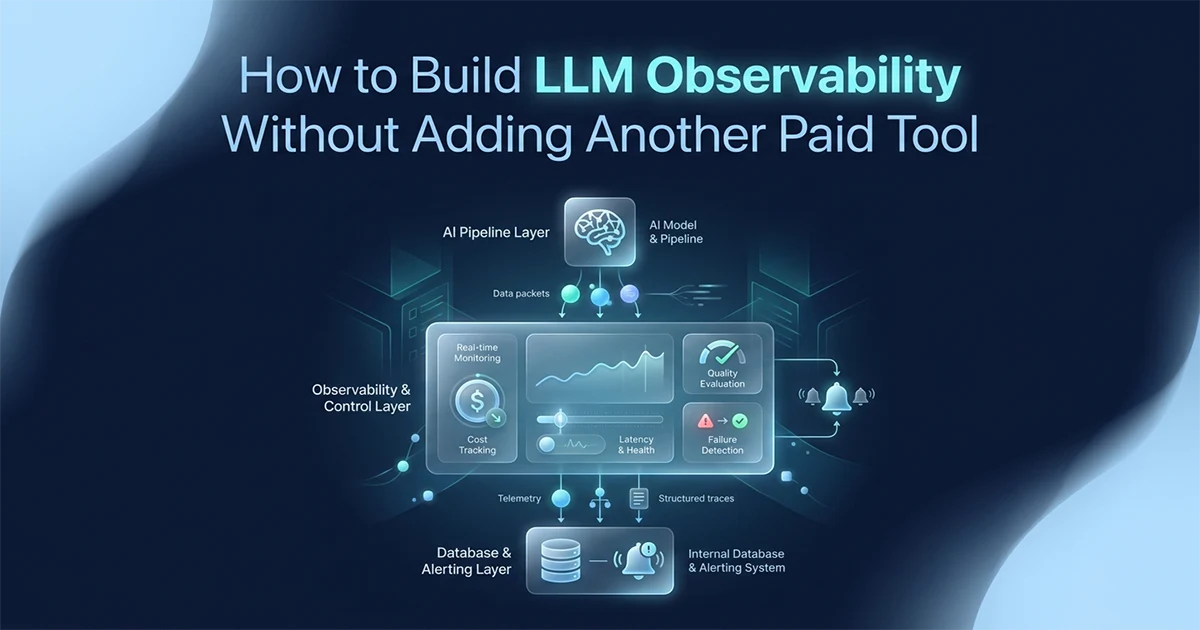
Every LLM observability guide tells you to install Langfuse or add Helicone as a proxy. Langfuse needs a database and Docker setup. Helicone routes every API call through their infrastructure — if they're down, your AI features are down. For a production AI pipeline running 161 sequential GPT-4o calls across 5 workers, I needed cost visibility, quality alerts, and failure notifications — without routing calls through a third party. Here's the 60-line Python class that replaced the paid tool, saved to my existing MongoDB, and fires Slack alerts before the invoice arrives.
This is not a takedown of paid tools. Langfuse is good. Helicone is good. This post is for developers who have a specific reason not to add another dependency: compliance, proxy risk, existing infrastructure, or simply not wanting to sign up for another service.
What LLM Observability Actually Requires — And What Paid Tools Add on Top
LLM observability requires four things: cost per call, latency per call, quality signal per output, and an alert channel — all achievable with 60 lines of Python and your existing database. Paid tools like Langfuse and Helicone add dashboards, prompt management, and integrations on top of this foundation.
Before comparing vendors, define what you actually need. These four components cover every production incident I've debugged across two anonymised systems — an AI report generation SaaS and a 10-tool Gemini content platform:
- Cost tracking:
(prompt_tokens + completion_tokens) × price = cost per call - Latency tracking: time from request sent to first token (TTFB) and total wall-clock time
- Quality monitoring: output length checks, format validation, score thresholds
- Failure alerts: when calls fail, when quality drops below threshold, when cost spikes
Langfuse (MIT, self-hostable) adds tracing dashboards and prompt management. Helicone (Apache-2.0, free up to 10K requests/month) adds a proxy gateway. Arize Phoenix integrates OpenTelemetry for experiments. LangSmith offers 5,000 traces/month free for LangChain-native workflows. Braintrust provides 1M trace spans/month on its free tier. OpenLLMetry and Traceloop are fully open-source. Portkey is an MIT-licensed unified API gateway. All are legitimate choices — the question is whether you need what they add, or only the four foundations above.
| Feature | Langfuse (self-hosted) | Helicone (proxy) | DIY (this guide) |
|---|---|---|---|
| Setup time | 2–4 hours (Docker) | 5 minutes | 30 minutes |
| External dependency | Self-hosted DB | Their proxy infra | None |
| LLM calls route through | Direct | Helicone's servers | Direct |
| If tool is down | Your app unaffected | Your AI features fail | Your app unaffected |
| Cost per month (10K+ req) | Hosting cost | Paid tier | $0 |
| Prompt management | Yes | No | No (not needed here) |
| Visual dashboard | Yes | Yes | No (DB queries instead) |
| Cost tracking | Yes | Yes | Yes — 60 lines |
| Quality monitoring | Yes | Basic | Yes — custom thresholds |
| Works inside Celery workers | Caution | Adds latency | Yes — no HTTP overhead |
| Compliance-friendly (no data leaving infra) | Yes | No | Yes |
Helicone and Portkey work as a proxy between your application and the LLM. Every API call routes through their infrastructure. If their proxy has an incident, your AI features stop working — regardless of whether OpenAI or Google are up. This is the structural tradeoff that proxy-based observability introduces. It's a legitimate tradeoff for many teams. For a pipeline running 161 sequential calls per job across 5 workers, I couldn't accept that dependency.
DIY observability makes sense when traces contain regulated user data you cannot send to a third party — healthcare, finance, and other regulated industries cannot route prompts and model outputs through a third-party proxy. When you already run MongoDB or PostgreSQL for application data, adding Langfuse means running another database service dedicated to traces. When Celery workers execute 161 calls in a tight loop, Helicone's HTTP proxy adds latency on every iteration. When Helicone's 10K free request limit is exceeded monthly at production scale, the paid tier becomes another line item. For a solo developer or small team shipping AI features, 60 lines of Python attached to infrastructure you already operate is often enough to ship with confidence.
The LLMObserver Class: Cost Tracking and Quality Monitoring in 60 Lines
The LLMObserver class wraps any async LLM call, records an LLMTrace with token counts, cost, latency, and output quality, saves it to your existing database, and fires configurable alerts — in approximately 60 lines, with no dependencies beyond your existing database driver.
The LLMTrace dataclass
Each API call produces one LLMTrace record: model name, prompt and completion token counts, latency in milliseconds, output character length, success flag, optional error string, and arbitrary metadata (job ID, section index, tool name, user ID). The cost_usd property calculates cost from a PRICING dictionary — GPT-4o at $2.50/1M input and $10.00/1M output, GPT-4o-mini at $0.15/$0.60, Gemini 2.5 Flash at $0.30/$2.50, Gemini 3.5 Flash at $1.50/$9.00. No stored cost value means provider price changes don't require data migration.
The observe() wrapper
Wrap the API call in observe(), which times the call with time.monotonic(), catches exceptions, extracts token usage from the response object, builds the trace in a finally block (so failed calls still get logged), checks quality thresholds, accumulates session cost, and saves — all without blocking the pipeline if the database write fails. The wrapper accepts any async callable — OpenAI's chat.completions.create, Gemini's generate_content, or a custom retry wrapper — as long as the response object exposes a usage attribute with token counts. Failed calls record success=False and the exception message, which is how you catch worker crashes and rate-limit storms before users report empty outputs.
from __future__ import annotations
import time
import logging
from dataclasses import dataclass, field
from datetime import datetime, UTC
from typing import Any, Callable, Optional

logger = logging.getLogger(__name__)

# ── PRICING: update when providers change rates ─────────────────────────
PRICING: dict[str, dict[str, float]] = {
    "gpt-4o":           {"input": 2.50,  "output": 10.00},
    "gpt-4o-mini":      {"input": 0.15,  "output": 0.60},
    "gemini-2.5-flash": {"input": 0.30,  "output": 2.50},
    "gemini-3.5-flash": {"input": 1.50,  "output": 9.00},
}

@dataclass
class LLMTrace:
    model: str
    prompt_tokens: int
    completion_tokens: int
    latency_ms: float
    output_length: int
    success: bool
    error: Optional[str] = None
    metadata: dict = field(default_factory=dict)
    timestamp: datetime = field(default_factory=lambda: datetime.now(UTC))

    @property
    def cost_usd(self) -> float:
        p = PRICING.get(self.model, {"input": 0.0, "output": 0.0})
        return (
            (self.prompt_tokens / 1_000_000) * p["input"] +
            (self.completion_tokens / 1_000_000) * p["output"]
        )

    def to_dict(self) -> dict:
        return {
            "model": self.model,
            "prompt_tokens": self.prompt_tokens,
            "completion_tokens": self.completion_tokens,
            "cost_usd": round(self.cost_usd, 8),
            "latency_ms": self.latency_ms,
            "output_length": self.output_length,
            "success": self.success,
            "error": self.error,
            "metadata": self.metadata,
            "timestamp": self.timestamp.isoformat(),
        }


class LLMObserver:
    """
    60-line production LLM observability.
    Zero external dependencies — plugs into your existing DB and alert channel.

    Usage:
        observer = LLMObserver(save_trace=mongo_save, alert=slack_alert)
        response = await observer.observe(
            lambda: client.chat.completions.create(...),
            model="gpt-4o", metadata={"job_id": "abc", "section": 3}
        )
    """

    def __init__(
        self,
        save_trace: Callable[[dict], None],
        alert: Optional[Callable[[str], None]] = None,
        cost_alert_usd: float = 5.0,
        min_output_chars: int = 50,
    ):
        self.save_trace = save_trace
        self.alert = alert
        self.cost_alert_usd = cost_alert_usd
        self.min_output_chars = min_output_chars
        self._session_cost: float = 0.0

    async def observe(
        self,
        func: Callable,
        model: str,
        metadata: dict | None = None,
    ) -> Any:
        """Wrap any async LLM call with full observability."""
        start = time.monotonic()
        response = error_msg = None

        try:
            response = await func()
            return response
        except Exception as exc:
            error_msg = str(exc)
            raise
        finally:
            latency_ms = round((time.monotonic() - start) * 1000, 2)

            usage = getattr(response, "usage", None)
            prompt_tokens = getattr(usage, "prompt_tokens", 0) if usage else 0
            completion_tokens = getattr(usage, "completion_tokens", 0) if usage else 0

            content = ""
            if response and error_msg is None:
                try:
                    content = response.choices[0].message.content or ""
                except (AttributeError, IndexError):
                    pass

            trace = LLMTrace(
                model=model,
                prompt_tokens=prompt_tokens,
                completion_tokens=completion_tokens,
                latency_ms=latency_ms,
                output_length=len(content),
                success=error_msg is None,
                error=error_msg,
                metadata=metadata or {},
            )

            try:
                self.save_trace(trace.to_dict())
            except Exception as db_err:
                logger.warning("Trace save failed: %s", db_err)

            self._session_cost += trace.cost_usd

            if trace.success and trace.output_length < self.min_output_chars:
                msg = (
                    f"Low-quality output from {model}: "
                    f"{trace.output_length} chars (min {self.min_output_chars}). "
                    f"Section: {metadata.get('section', '?') if metadata else '?'}"
                )
                logger.warning(msg)
                if self.alert:
                    self.alert(msg)

            if self._session_cost > self.cost_alert_usd:
                msg = (
                    f"Cost alert: ${self._session_cost:.4f} spent "
                    f"(threshold ${self.cost_alert_usd})"
                )
                logger.warning(msg)
                if self.alert:
                    self.alert(msg)
                self._session_cost = 0.0

    @property
    def session_cost(self) -> float:
        return round(self._session_cost, 6)
Saving Traces to Your Existing Database and Firing Alerts Without a Dashboard
Plug the LLMObserver into your existing MongoDB or PostgreSQL database with a single save function, and route alerts to Slack via webhook or email via SendGrid — no new infrastructure, no new accounts.
MongoDB save and aggregate queries
The save function is three lines: get a collection reference, call insert_one. The value is in the aggregate pipeline — total cost per job, average latency per model, error rate per section type, and low-quality call counts. Run these at job completion for billing reconciliation and at month-end for per-user quota enforcement. PostgreSQL works identically: insert traces into an llm_traces table with a JSONB metadata column, then query with GROUP BY metadata->>'job_id' and SUM(cost_usd). The observer class does not care which database you use — only that save_trace accepts a dict and returns nothing. Index metadata.job_id and metadata.user_id for fast aggregates at scale.
import os
import httpx
from pymongo import MongoClient
from openai import AsyncOpenAI

# ── MongoDB save (3 lines) ──────────────────────────────────────────────
client_db = MongoClient(os.environ["MONGODB_URI"])
traces = client_db["myapp"]["llm_traces"]

def save_to_mongo(trace: dict) -> None:
    traces.insert_one(trace)

# ── Slack alert via webhook ────────────────────────────────────────────
def slack_alert(message: str) -> None:
    """Fire-and-forget Slack alert. Use a task queue for retries in production."""
    httpx.post(
        os.environ["SLACK_WEBHOOK_URL"],
        json={"text": message},
        timeout=3.0,
    )

# ── Plug it all together ───────────────────────────────────────────────
observer = LLMObserver(
    save_trace=save_to_mongo,
    alert=slack_alert,
    cost_alert_usd=5.0,
    min_output_chars=100,
)

openai_client = AsyncOpenAI()

async def generate_section(section_prompt: str, section_index: int) -> str:
    response = await observer.observe(
        func=lambda: openai_client.chat.completions.create(
            model="gpt-4o",
            messages=[{"role": "user", "content": section_prompt}],
            max_tokens=12_000,
        ),
        model="gpt-4o",
        metadata={"section": section_index, "job_id": current_job_id},
    )
    return response.choices[0].message.content or ""

# ── Useful MongoDB aggregate: cost + quality per job ──────────────────
def get_job_summary(job_id: str) -> dict:
    pipeline = [
        {"$match": {"metadata.job_id": job_id}},
        {"$group": {
            "_id": "$metadata.job_id",
            "total_cost_usd":    {"$sum": "$cost_usd"},
            "avg_latency_ms":    {"$avg": "$latency_ms"},
            "total_calls":       {"$sum": 1},
            "failed_calls":      {"$sum": {"$cond": [{"$eq": ["$success", False]}, 1, 0]}},
            "low_quality_calls": {"$sum": {"$cond": [{"$lt": ["$output_length", 100]}, 1, 0]}},
        }}
    ]
    return traces.aggregate(pipeline).next()
Two Production Patterns: The 161-Call Report Pipeline vs the 10-Tool SaaS
A sequential AI report pipeline needs per-call cost accumulation with a per-job ceiling alert; a multi-tool SaaS needs per-tool quality baselines and per-user cost quota enforcement — both patterns work with the same LLMObserver class, configured differently per use case.
Pattern A — Sequential pipeline (the AI report SaaS)
An AI report generation SaaS runs 161 sequential GPT-4o calls per large report over 2–4 hours inside Celery workers — any of 5 worker processes can crash mid-job. Before observability, the $203 first run had no cost visibility until the invoice arrived. After: every call logs tokens and cost, cumulative spend tracks per job, and a $25 cost ceiling fires a Slack alert before runaway spend repeats.
Each of the 161 calls wraps with observe(). Metadata includes {"job_id": job_id, "section_index": i, "report_type": "full"}. Worker crash detection layers on top: if a section's trace never appears in MongoDB within the expected window, alert separately. The async AI pipeline guide for long-running Python jobs covers how the 161 calls are structured inside a Celery worker — the observer wraps directly into that pattern without any architectural change.
The cost visibility that observability provides is what revealed the $203 naive first run. Once every call was logged, the optimization path was clear — the journey from $203 to $14 started with knowing where the tokens were actually going, as documented in the GPT-4o production cost optimization guide.
Pattern B — 10-tool content platform
A 10-tool AI content platform runs Gemini 2.5 Flash for ad copy, captions, scripts, and emails. Each tool should produce at least 100 characters of structured output. Configure min_output_chars per tool — 600 for a 150-word ad copy tool, 50 for a hashtag suggestion list. Pass metadata={"tool": "facebook_ad", "user_id": session.user.id} on every call, then aggregate by metadata.tool to catch prompt regressions when average output length drops across a rolling window.
For per-user cost tracking in a multi-tenant SaaS, add the user ID to every trace's metadata: metadata={"tool": "facebook_ad", "user_id": session.user.id}. Then run the aggregate grouped by metadata.user_id to enforce per-user monthly quotas without a separate Redis-based tracking system. One MongoDB query gives you the full picture at billing time.
Building Quality Monitoring Without an LLM-as-Judge
Production quality monitoring without a paid tool starts with quantitative signals — output length, format validation, response time — that catch the most common failure modes without requiring another LLM call to score the output.
The quantitative quality signals
- output_length: below threshold means incomplete generation — the most common failure across both production systems
- latency_ms: a call taking 3× the section average usually indicates timeout, rate limiting, or model slowdown
- error rate: track
success=Falseover a rolling 50-call window per tool or section type - format validation: for structured JSON output, validate against your Zod or Pydantic schema and log validation failures in the trace metadata
When to add LLM-as-judge scoring
For systems where output quality is business-critical — a $14 professional report must be accurate, not just long enough — a secondary LLM-as-judge call adds a numeric quality score (~$0.002 per judgment on GPT-4o-mini at $0.15/1M input). This catches semantic failures that length checks miss: hallucinated citations, wrong tone, or off-topic sections. Log the score in trace metadata and alert when the rolling average drops below 0.7. Add this only after quantitative signals are in place — length and latency catch 80% of production failures at zero extra API cost. The judge call itself can wrap in the same observe() method with metadata={"type": "quality_judge", "parent_section": 3} so judge costs appear separately in your per-job aggregate.
When to Add a Paid Tool (The Honest Answer)
Add Langfuse when multiple developers need a shared dashboard for debugging, prompt management across team members, or annotation workflows. Add Helicone when you need multi-provider cost visibility out of the box and the proxy risk is acceptable for your use case.
The three signals that mean you've outgrown DIY
- More than 3 developers working on the AI system — shared visibility needs a UI, not MongoDB aggregates
- Prompt A/B testing at scale — Langfuse's prompt management is hard to replicate in a weekend
- Non-engineers need to review AI outputs — dashboards beat ad-hoc database queries
The signals that mean DIY is correct
- Solo or pair engineering the system
- Compliance or data sovereignty requirements — traces stay in your infrastructure
- Already using MongoDB or PostgreSQL for everything else
- Running in Celery workers where proxy latency matters
- Helicone's 10K free request limit exceeded monthly at production scale
I document production LLM observability patterns on hassanr.com because the gap between "install Langfuse" and "know your per-job cost before the invoice" is where most solo AI engineers get surprised. Hassan Raza built this observer for two live production systems — 161-call pipelines and 10-tool SaaS platforms — without adding a single paid observability account.
Frequently Asked Questions
Calculate cost per call with (prompt_tokens / 1,000,000) × input_price + (completion_tokens / 1,000,000) × output_price. For GPT-4o, that's $2.50 per million input tokens and $10.00 per million output tokens. Log this value on every response using an LLMTrace dataclass that computes cost_usd from a PRICING dictionary — never store a fixed cost field, so price updates don't require migrations. Save each trace to MongoDB or PostgreSQL and run aggregate queries for cost per job, per user, or per model. Set a per-session cost ceiling in your observer class that sends a Slack alert when accumulated spend crosses the threshold — before the invoice arrives, not after.
LLM observability is logging and monitoring the cost, latency, quality, and failure rate of every LLM API call in production. It matters because LLM behavior is non-deterministic: the same prompt can produce outputs with wildly different quality, length, and cost. Without observability, failures stay invisible until a user complains or an invoice lands. The four core components are cost tracking (tokens × price per call), latency tracking (time to first token and total duration), quality monitoring (output length checks and format validation), and alerting (Slack or email when thresholds break).
Track quality with quantitative proxies that need no visual UI: output_length below your minimum signals incomplete generation, latency_ms spikes above 2× the section average indicate slowdowns or timeouts, and error rate over a rolling window catches systemic failures. Save these fields alongside each API call in MongoDB or PostgreSQL. Fire a Slack webhook when output_length drops below the threshold for that tool or section type. For semantic correctness — whether the answer is factually right — add an optional LLM-as-judge call that scores output 0–1 and logs the score with the trace.