
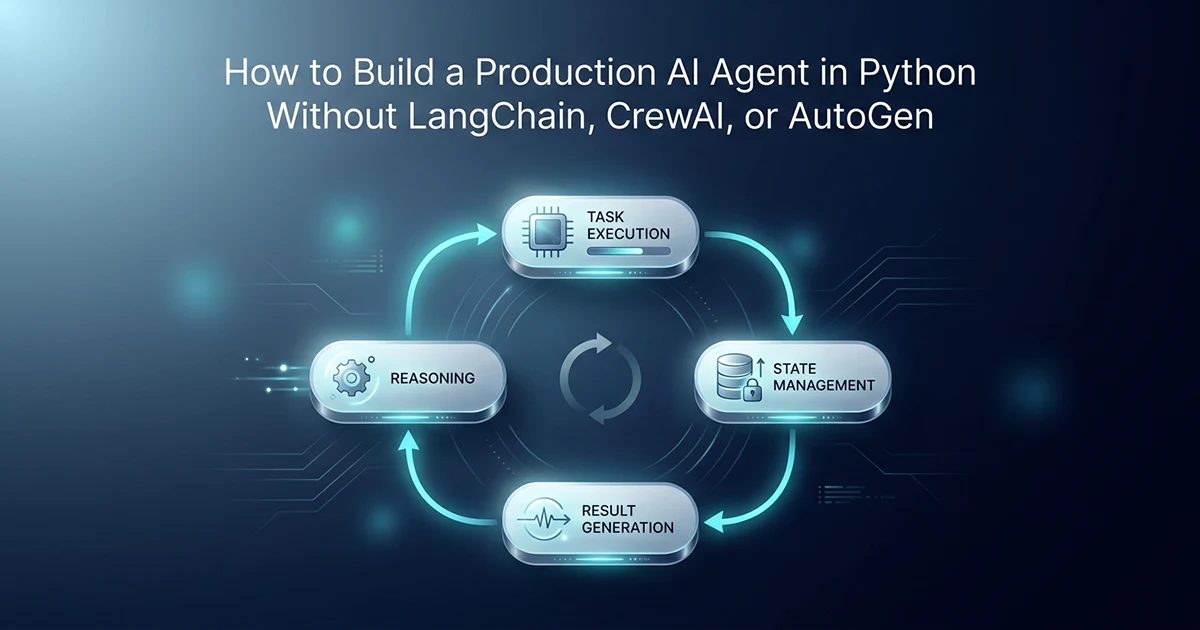
What an 'AI Agent' Actually Is (Frameworks Made It Sound Harder Than It Is)
An AI agent is a loop that calls an LLM, reads the output, optionally executes a tool, then calls the LLM again — repeating until the task is complete or a step limit is hit. Every framework — LangChain, CrewAI, AutoGen — wraps this loop.
The 2026 framework landscape matters for choosing wisely, not for fear of missing out. LangGraph sees roughly 34.5M monthly downloads and excels at graph-based state persistence and human-in-the-loop checkpoints. CrewAI has about 5.2M monthly downloads and 44,300 GitHub stars — strong for role-based multi-agent teams. AutoGen is in maintenance mode: Microsoft merged it into the Microsoft Agent Framework. Existing AutoGen projects still run, but starting a new project on AutoGen in 2026 means betting on a stack that is no longer actively developed. OpenAI's Agents SDK and Google's ADK (Agent Development Kit, announced at I/O 2026) are the new native options.
Understanding the primitive underneath means you are never blocked when a framework goes stale or when a tutorial recommends a deprecated stack. For predictable, long-running production pipelines, raw Python is often the better choice — not because frameworks are bad, but because they abstract the easy part (the API call) and leave the hard parts (cost control, crash recovery, your database) entirely to you.
| What you need in production | Framework provides? | Build yourself in raw Python? |
|---|---|---|
| API call abstraction | Yes | Yes (3 lines of code) |
| Tool routing/dispatch | Yes | Yes (dict lookup) |
| Cost per step controls | No | Yes (max_tokens param) |
| Crash recovery + resume | No | Yes (database checkpoint) |
| Your database integration | No | Yes (your ORM/driver) |
| Existing job queue integration | No | Yes (Celery, RQ, BullMQ) |
| Context window management | Basic | Yes (domain-specific) |
| Rate limit + exponential backoff | Basic | Yes (your tier's rules) |
| Debugging transparency | Black box | Yes — your code, your stack traces |
LangChain genuinely adds value when you need 500+ integrations, vector store connectors, or graph-based orchestration with LangGraph's checkpointing UI. CrewAI genuinely adds value when you need role-based agents — a researcher agent, a writer agent, a critic agent — delegating tasks to each other. None of them add per-step token budgets tuned to your pricing model, resume logic that restarts at section 83 instead of section 1, or integration with the Celery queue you already run in production. Those are your problems. Frameworks hand you the loop; you still own everything that determines whether the loop survives a 4-hour job at 2am.
Pattern 1: The Tool-Calling Agent — 80 Lines of Raw Python
A function-calling AI agent that decides which tools to use and in what order is a for loop, a single OpenAI API call, a tool dispatch function, and an exit condition — approximately 80 lines of Python, no dependencies beyond the OpenAI SDK.
What the loop does at each step
Step 1: Send messages (including conversation history) to the model. Step 2: The model returns either a text response or tool_calls. Step 3: If text response — done, return it. Step 4: If tool_calls — execute each tool, append results as role: "tool" messages, return to Step 1. Step 5: If max_steps is hit — raise RuntimeError to prevent infinite loops and runaway bills.
import asyncio
import json
from openai import AsyncOpenAI
from typing import Any, Callable

client = AsyncOpenAI()

# ── Tool registry ──────────────────────────────────────────────────────────
TOOLS: dict[str, Callable] = {}
TOOL_SCHEMAS: list[dict] = []

def register_tool(name: str, description: str, parameters: dict):
    """Decorator: register a Python function as an agent tool."""
    def decorator(func: Callable) -> Callable:
        TOOLS[name] = func
        TOOL_SCHEMAS.append({
            "type": "function",
            "function": {"name": name, "description": description, "parameters": parameters}
        })
        return func
    return decorator

# ── Example tools — swap in whatever your agent needs ─────────────────────
@register_tool(
    name="search_knowledge_base",
    description="Search the internal knowledge base for relevant information",
    parameters={
        "type": "object",
        "properties": {"query": {"type": "string"}},
        "required": ["query"]
    }
)
async def search_kb(query: str) -> str:
    # Replace with your actual retrieval logic
    return f"Knowledge base results for: {query}"

# ── The core agent loop — everything LangChain's AgentExecutor does ────────
async def run_agent(
    goal: str,
    tools: list[dict] = None,
    max_steps: int = 20,
    model: str = "gpt-4o",
    max_tokens_per_step: int = 1500,  # token budget = cost control
) -> str:
    if tools is None:
        tools = TOOL_SCHEMAS

    messages = [{"role": "user", "content": goal}]

    for step in range(max_steps):
        response = await client.chat.completions.create(
            model=model,
            messages=messages,
            tools=tools,
            tool_choice="auto",
            max_tokens=max_tokens_per_step,
        )

        message = response.choices[0].message
        messages.append({
            "role": "assistant",
            "content": message.content,
            "tool_calls": [tc.model_dump() for tc in (message.tool_calls or [])],
        })

        # No tool calls = agent decided it's done
        if not message.tool_calls:
            return message.content or ""

        # Execute each requested tool
        for tool_call in message.tool_calls:
            func_name = tool_call.function.name
            func_args = json.loads(tool_call.function.arguments)

            try:
                if func_name not in TOOLS:
                    result = f"Error: tool '{func_name}' is not registered"
                else:
                    result = await TOOLS[func_name](**func_args)
            except Exception as e:
                result = f"Tool execution error: {e}"

            messages.append({
                "role": "tool",
                "tool_call_id": tool_call.id,
                "content": str(result),
            })

    raise RuntimeError(
        f"Agent did not complete within {max_steps} steps. "
        "Refine your goal or increase max_steps."
    )

# ── Usage ──────────────────────────────────────────────────────────────────
if __name__ == "__main__":
    result = asyncio.run(run_agent(
        goal="Research AI cost optimization strategies and summarise the top 3 techniques",
        max_steps=15,
        max_tokens_per_step=1000,
    ))
    print(result)
What max_steps=20 actually does
This is your production cost guard. If the agent enters a loop — calling the same tool repeatedly with no progress — max_steps=20 at max_tokens_per_step=1500 caps exposure at roughly 30,000 output tokens per runaway session. LangChain does not set this for you. CrewAI does not. You do — and if you forget, the bill arrives at 3am.
The @register_tool decorator pattern keeps tool schemas co-located with implementations — when you add a fourth tool, you add one function and one schema entry, not a separate config file that drifts out of sync. The TOOLS dict is your dispatch table: func_name from the API response maps directly to a Python callable. That is the entire routing layer. No graph compiler, no agent class hierarchy, no import chain through six LangChain modules to find why search_kb was never registered.
Pattern 2: The Sequential Pipeline — What a 161-Step Production Report Actually Uses
When the workflow is predetermined — not dynamically decided by the model — a sequential pipeline is more reliable than a tool-calling agent: each step generates content, checkpoints to a database, and the pipeline resumes exactly from the last completed step after any crash.
When sequential beats agentic
For an AI report generation SaaS, the sections are known upfront. There is no routing decision for the model to make — just generation. The intelligence lives in each generation call; the routing is deterministic Python. That is stronger than an agent for this use case: no unexpected tool-call patterns, predictable cost per run, trivial to resume after crash. Each of the 161 calls reads current state (previous sections), transforms it (produces the next section), and exits when all sections complete or max retries exceed — architecturally equivalent to what LangChain's AgentExecutor does, without abstraction overhead or version conflicts.
The context management problem
161 sections × roughly 800 tokens per section = 128,800 tokens of context if you naively pass everything forward. GPT-4o's 1M context window can absorb that technically — but passing 80,000 tokens of previous sections to generate section 82 costs about $0.20 per call alone. The solution: a context window budget. Pass only the last 2,000 tokens of completed sections forward. Enough continuity for narrative flow; a fraction of the cost.
import asyncio
import time
from openai import AsyncOpenAI

client = AsyncOpenAI()
TOKEN_BUDGET_PER_SECTION = 12_000
INTER_BATCH_SLEEP = 2.0  # seconds — tuned to GPT-4o rate limits at production tier

async def get_pipeline_progress(order_id: str) -> dict:
    # Load from MongoDB: { "last_section": 82, "completed": [...] }
    ...

async def save_pipeline_progress(order_id: str, section_index: int, content: str) -> None:
    # Upsert section document with section_index and generated text
    ...

def build_context_window(completed: list[str], max_context_tokens: int = 2000) -> str:
    """Pass only recent sections — not all 160 previous."""
    combined = "\n\n".join(completed)
    # Truncate from the start to stay within budget (use tiktoken in production)
    return combined[-max_context_tokens * 4:]  # rough char estimate

async def generate_section(section_prompt: str, context: str) -> str:
    response = await client.chat.completions.create(
        model="gpt-4o",
        messages=[
            {"role": "system", "content": section_prompt},
            {"role": "user", "content": f"Previous sections:\n{context}"},
        ],
        max_tokens=TOKEN_BUDGET_PER_SECTION,
    )
    return response.choices[0].message.content or ""

async def run_report_pipeline(order_id: str, sections: list[dict]) -> None:
    progress = await get_pipeline_progress(order_id)
    start_from = (progress.get("last_section") or -1) + 1
    completed_texts = progress.get("completed", [])

    for i in range(start_from, len(sections)):
        section = sections[i]
        context = build_context_window(completed_texts, max_context_tokens=2000)

        content = await generate_section(section["prompt"], context)
        completed_texts.append(content)

        await save_pipeline_progress(order_id, i, content)
        await asyncio.sleep(INTER_BATCH_SLEEP)

    # Pipeline complete — trigger delivery webhook, meter event, email
Different section types in the production report use different system prompts — introduction, analysis, summary, appendix. That is tool-like dispatch without tool calls: deterministic routing in Python, AI generation inside each branch. TOKEN_BUDGET_DAILY=12,000 per section call caps any single generation from consuming the entire job budget. Combined with the 2,000-token context window, a 161-step run stays predictable where a naive agent might decide to "re-research" section 40 and burn 50,000 tokens re-reading everything.
The 3 Production Additions Every Agent Needs — That No Framework Builds For You
The three production requirements no framework installs for you are crash-safe checkpointing (resume from the last completed step, not from zero), rate-limit-aware sleeping (your tier's rules, not the framework's guess), and cost monitoring that fires before the invoice arrives.
Crash-safe checkpointing
Save to your database after every step. Load progress at pipeline start. I learned this after a Render worker restarted at step 83 of 161. Without checkpointing, the entire 2.5-hour run would have restarted from zero. With MongoDB progress tracking and Celery task_acks_late=True, the pipeline loaded from the database and resumed at step 84. Zero data loss on worker crash — five dedicated Render workers, one per product type, each with the same checkpoint pattern.
Rate-limit-aware sleeping
INTER_BATCH_SLEEP=2.0 seconds between batches is not arbitrary — it is tuned to GPT-4o rate limits at my production tier. LangChain's retry handler backs off on 429 errors reactively, but it does not know your tier's proactive limits. You build: sleep between calls, exponential backoff on 429, alert when approaching limits. Keeping a 4-hour pipeline alive requires this discipline — covered in depth in the long-running async AI pipeline guide.
Cost monitoring per step
Log token usage after each API call. Accumulate per job. Alert if job cost exceeds a threshold before invoicing. The $203 first run was a surprise because I had no monitoring. Now every pipeline job logs token cost per section and fires an alert if the total exceeds $25. That is how $203 naive became $14 after optimization — you cannot optimize what you do not measure.
Business-specific retry logic is the third layer frameworks skip. When section 83 fails on a malformed JSON response, retry section 83 — not the entire 161-call pipeline. When section 83 fails three times, mark the order for manual review and alert ops. LangChain's generic retry wraps the whole chain; your production system needs surgical retries at the step that failed, with a different temperature or a shorter prompt on attempt two. That logic lives in your generate_section() wrapper, not in a framework config file.
When a Framework Is Actually Worth Adding
A framework earns its place when your workflow is genuinely non-deterministic (the model decides routing), you need multi-agent collaboration across separate processes, or you need LangGraph's state persistence and human-in-the-loop checkpointing at graph nodes.
Use LangGraph when
- Your workflow is a graph, not a sequence — conditional branches between steps
- You need human-in-the-loop approvals at specific nodes
- You are building a team system where multiple agents collaborate
- You are already on LangChain with 50+ integrations you rely on daily
Stay frameworkless when
- Your workflow is sequential and predictable (like a 161-step report pipeline)
- You are integrating with existing infrastructure (Celery, your PostgreSQL or MongoDB)
- You need transparency: when something breaks at 3am, you want your stack traces
- You are building your first production agent and want to understand every step
CrewAI's 5.2M monthly downloads reflect real demand for multi-agent collaboration — two agents debating a strategy before a third writes the output. That is a different problem than a 161-step report where every step is known on day one. Pick the pattern first: dynamic routing (Pattern 1) or predetermined sequence (Pattern 2). Pick a framework only if the pattern genuinely needs graph state, role delegation, or dozens of pre-built connectors you would otherwise write yourself.
The framework doesn't write your production code — you do. Every major framework abstracts the API call, which is 3 lines. You still write the retry logic, the cost controls, the crash recovery, the rate limit handling, and the context management. These are the parts that keep your agent alive at 3am. They're also the parts no framework installs for you.
The same no-framework philosophy applies to retrieval — building directly on OpenAI embeddings and pgvector, as in the RAG pipeline without LangChain guide, gives you the same transparency and control. I document these patterns on hassanr.com because production AI engineering is about what survives at scale, not what demos well in a notebook.
Getting Started: The Minimum Viable Agent in 5 Minutes
Start with the tool-calling pattern if your workflow is dynamic, the sequential pipeline if it is predetermined, and add cost monitoring and checkpointing before the first production run — not after.
Starting checklist
pip install openai— that is the only dependency for Pattern 1- Implement 1–2 tools for your use case (search, write, lookup)
- Set
max_stepsandmax_tokens_per_stepexplicitly — never leave them unlimited - Add database checkpointing before running more than 10 steps
- Add token cost logging after each API call
- Test: intentionally fail mid-pipeline and verify resume logic works
Start with max_steps=5 and max_tokens_per_step=500 on your first run. Watch token usage and behavior. Increase gradually. The first production mistake is always "I didn't set a token budget and now I have a $200 testing bill."
Frequently Asked Questions
An AI agent is a loop that calls an LLM, reads the output, optionally executes a tool based on the response, appends the result to the conversation, and repeats until the task is complete or a step limit is hit. In Python, this is implemented with any LLM SDK (OpenAI, Anthropic), a dictionary of callable tools, and a for loop. Every framework — LangChain, CrewAI, AutoGen — wraps this same pattern. Understanding the primitive means you can build agents that integrate with your existing infrastructure, cost controls, and failure recovery patterns without depending on framework abstractions that may change between versions.
No. An AI agent requires only an LLM API client and a for loop. LangChain, CrewAI, and AutoGen provide abstractions and integrations useful for some use cases — particularly complex multi-agent workflows with many external tool integrations — but they do not add the production requirements that matter most: crash-safe checkpointing, cost monitoring, rate-limit-aware sleeping, and domain-specific context window management. These must be built regardless of whether you use a framework. AutoGen is now in maintenance mode as of early 2026, having been merged into Microsoft's Agent Framework — another reason to build on primitives rather than framework-specific abstractions.
Two patterns cover most production use cases. For dynamic workflows where the model decides which action to take: implement a tool-calling agent — a loop that sends messages to GPT-4o with tools, executes tool_calls, and returns the final text response. Set max_steps (20 is a reasonable default) and max_tokens_per_step (500-1500 depending on task) as hard cost controls. For predetermined workflows: implement a sequential pipeline that generates each step, saves a checkpoint to your database after each step, and loads progress on startup to resume after crashes. Add token cost logging from day one. The first production surprise is always an unexpectedly large bill from a loop that ran longer than expected.